.jpg?tr=w-930,h-720)
Preview in:
The AI boom moved fast. Between 2023 and 2025, individual subscriptions for AI tools became as normalized as Slack or Notion. But unlike those tools, nobody planned for the sprawl.
Individual power users now spend between $100 and $200 monthly across separate AI tools. For a team of five, that math gets ugly quickly.
This isn't an argument against using AI. It's an argument against the assumption that more tools equals more capability. Your team doesn't need five subscriptions. It needs access to the right models in one place.
The hidden costs of multiple AI tools
The most obvious cost is the subscription stack itself. Traditional individual subscriptions for ChatGPT Plus, Claude Pro, and Gemini Advanced average $20 per user per month, which adds up to $60 per person before you've even opened a browser tab.
But that's the easy number to spot. The harder costs to quantify are the ones that don't show up on a credit card statement.
Context switching is a real productivity drain
Every time someone switches from Claude to ChatGPT to Gemini, they're rebuilding mental context.
Different interfaces, different shortcut behaviors, different ways of formatting outputs.
A freelancer's AI tech stack is now pricier than it was in early 2023, and that's before accounting for the time spent managing it.
Institutional knowledge gets scattered
Brand guidelines you spent time crafting into a system prompt in ChatGPT don't exist in Claude.
Custom instructions your marketing team built for one platform have to be rebuilt, or, more likely, just aren't in another.
Prompts that work well for one task disappear when that team member leaves or switches tools. There's no single source of truth.
Compliance and data privacy become messy fast
Managing which employees have access to which tools, ensuring sensitive data isn't being processed by a vendor whose DPA you haven't reviewed, and tracking who's sending what to which model (across five different providers) is not a small governance problem.
Emerging AI regulation in 2026 could require businesses to disclose their AI strategies. A scattered tool stack makes that harder.
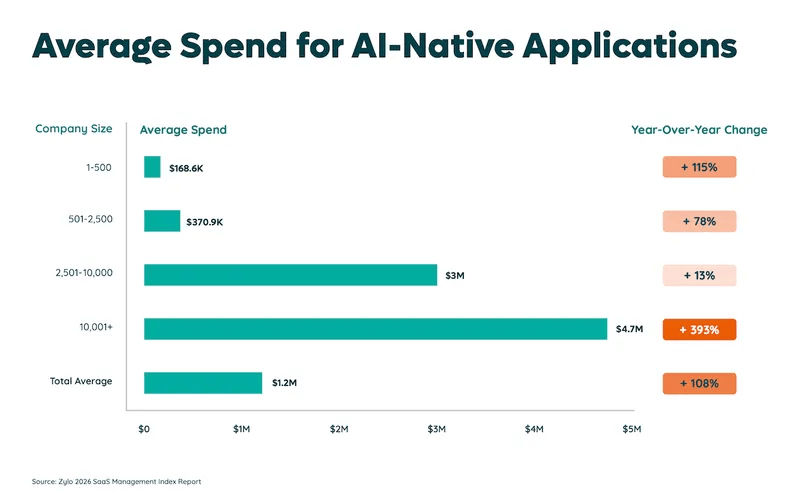
According to Zylo's 2026 SaaS Management Index, organizations spent an average of $1.2M on AI-native apps, a 108% year-over-year increase. Most of that isn't deliberate investment; it's accumulated subscriptions that nobody audited.
The myth of one perfect AI
Here's why teams end up with five tools in the first place: the models genuinely are different.
OpenAI's GPT-5 series tends to perform well on complex reasoning and code generation. Anthropic's Claude handles nuanced writing, long documents, and tasks where tone precision matters.
Google's Gemini has strong integration with search and real-time data. Meta's open-source Llama models give teams that want flexibility without vendor lock-in a viable path.
These distinctions show up in actual work. So the instinct to grab multiple subscriptions is rational.
It comes from a real observation: different tasks have different best answers, and no single model gets everything right every time.
Running ChatGPT, Claude, and Gemini as three separate standalone subscriptions is the equivalent of buying three different accounting software packages because each one handles a slightly different report better.
The capability you want is real. The method to get it is wasteful. McKinsey's 2025 State of AI survey found that 88% of respondents say their organizations use AI in at least one business function, but most are still in experimentation or pilot stages rather than full-scale deployment.
Part of that gap between experimentation and real deployment is structural. Teams can't build consistent workflows across five disconnected interfaces.
What you need is access to multiple models, rather than multiple subscriptions.
What a multi-model AI workspace actually looks like
The idea is straightforward: one interface that connects to multiple top-tier models, so your team can use GPT, Claude, or Gemini depending on the task, without logging into three separate products to do it.
In practice, that means a single login, a unified conversation history, and one place where your team's prompts, workflows, and brand guidelines live.
You don't rebuild context every time you switch models. You switch within the same thread and keep going.
Your institutional knowledge, such as the prompts that work, the tone guidelines, and the reference documents, all stay in one place rather than scattered across personal accounts on five different platforms.
The workflow benefits compound quickly. When everyone on a team uses the same interface, you can actually standardize how AI gets used.
You can build a shared prompt library that new hires inherit on day one instead of rebuilding from scratch.
You can upload internal documents and reference them directly in a conversation.
You can review outputs in a consistent format, compare model responses side-by-side, and make deliberate decisions about which model to trust for which job.
None of that is possible when your team is spread across five disconnected tabs. The models themselves aren't the bottleneck. The infrastructure around them is.
I found Geekflare Chat
Geekflare Chat is the tool I kept coming back to when researching this space, partly because it's new and partly because it's built specifically around the multi-subscription problem rather than being a general-purpose AI wrapper.
Geekflare Chat is an AI workspace platform that unifies AI models from OpenAI, Anthropic, and Google under one subscription. It offers access to GPT, Claude, and Gemini via a single interface, without the need for separate subscriptions.
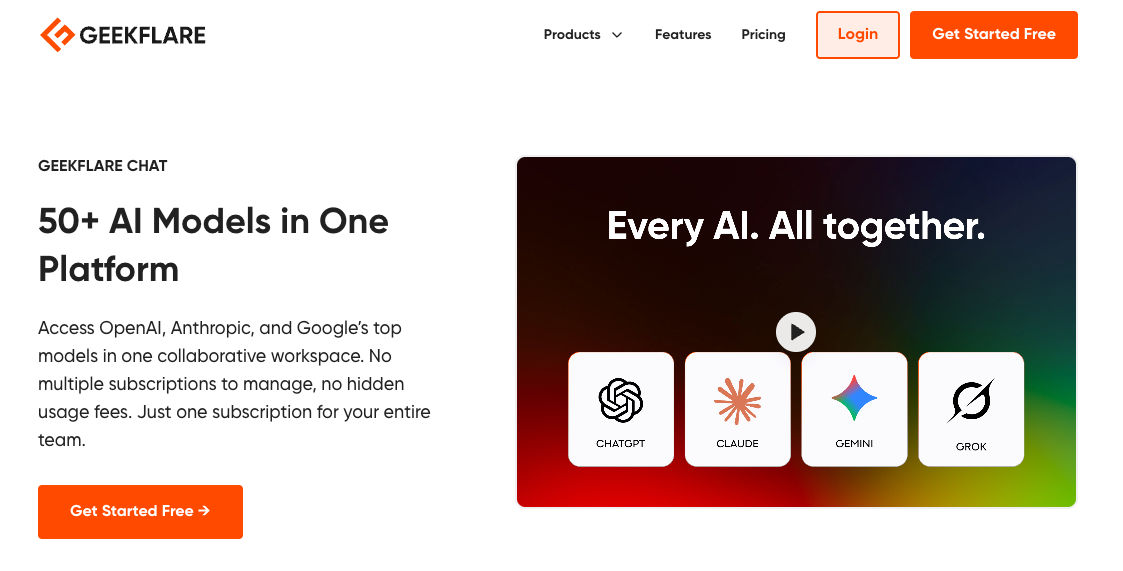
The pricing is direct: the Pro tier is $9 per month and gives you access to top-tier models, such as GPT-5.5, Claude 4.5, and Gemini 3.1 Pro. An 85% savings compared to buying each subscription separately.
The Business plan at $29/month covers five seats with 15,000 monthly credits and unlimited workspaces.
Here's what makes the platform practically useful, rather than just cheap:
Multi-model comparison
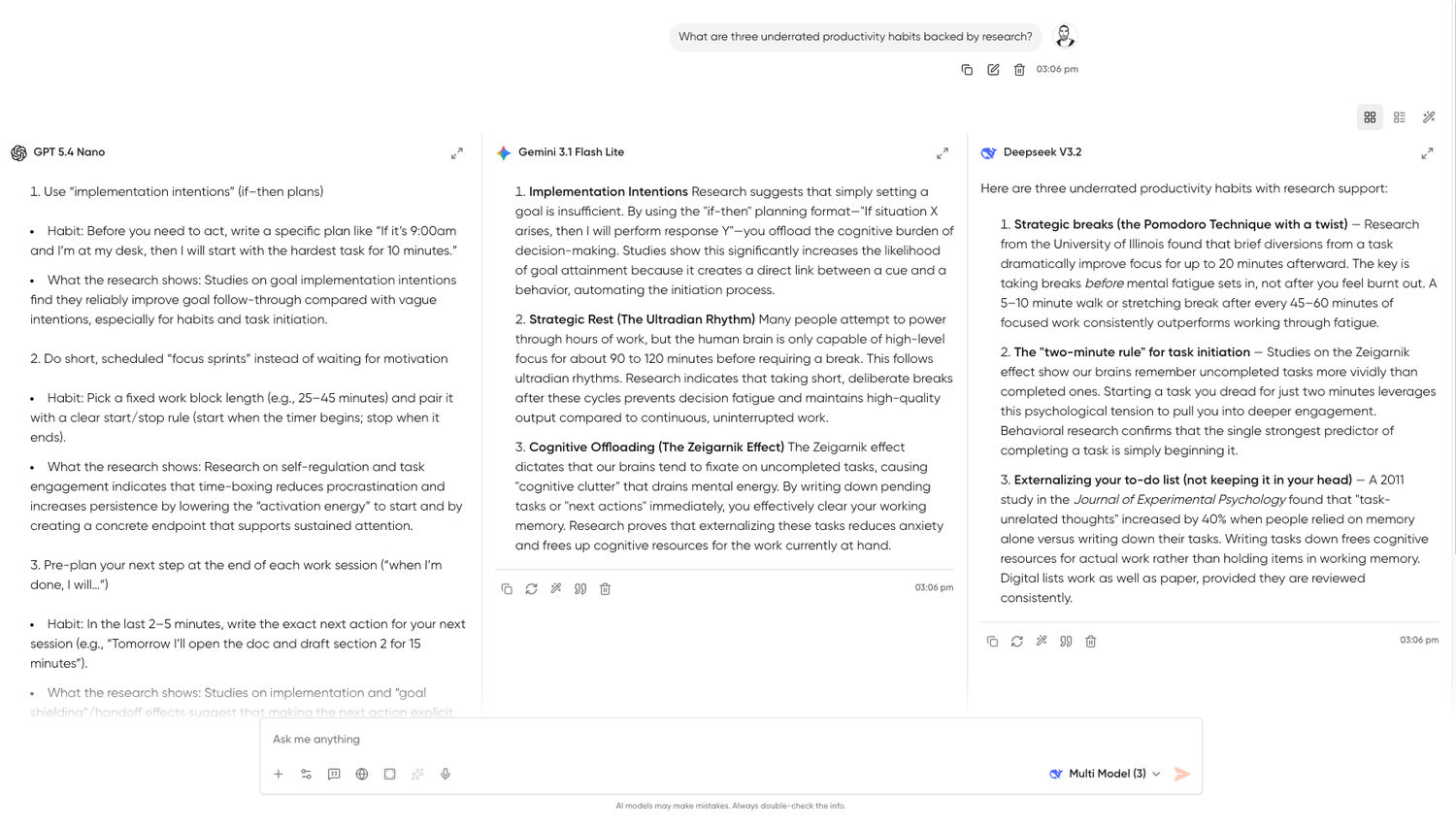
The Multi-Model Comparison tool allows teams to run a single prompt and view responses from GPT, Claude, and Gemini side-by-side to immediately identify the best output for their specific task.
This is super useful for anyone who's spent time wondering which model to trust for a particular job. Run the prompt once, see three answers, pick the one that's actually right.
Switch models mid-conversation without losing context
You can start a conversation with Claude and switch to GPT-5 midway through: the thread stays intact.
That's a meaningful workflow improvement over the current tab-juggling approach.
Shared prompt library
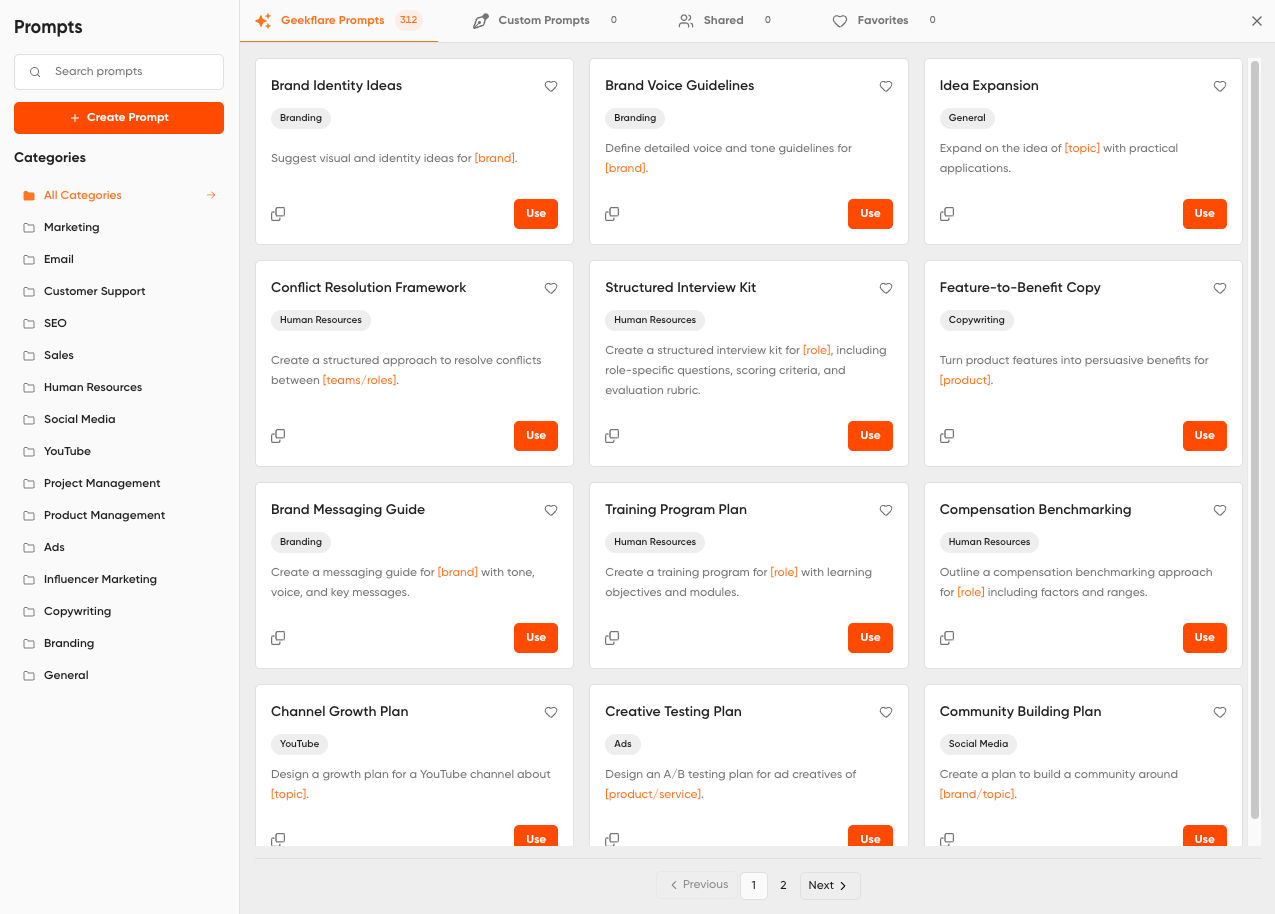
Your team's best-performing prompts live in one place, accessible to everyone. No more re-explaining your brand tone to every new hire or rebuilding a prompt from scratch because it lived in someone's personal ChatGPT history.
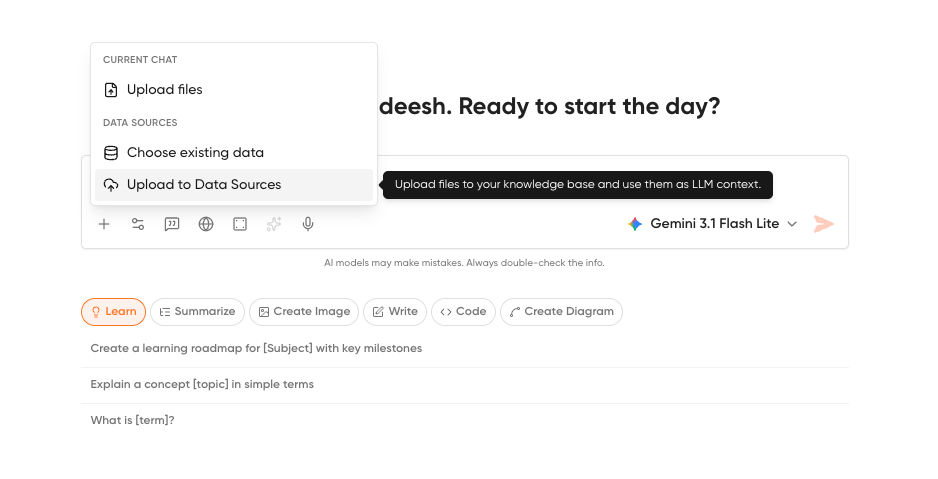
Knowledge base (RAG)
You can upload company documents, guidelines, and reference material, and chat with them directly. This is the feature that makes AI genuinely useful for ops and support teams rather than just content writers.
Collaborative workspaces
Centralized company data and standardized prompts ensure brand consistency across the team. You can invite team members and control access, which matters more as AI usage scales.
Real-time web access and image generation
The platform has live search built in, so queries that need current information don't require leaving the workspace or switching to a different tool.
Privacy
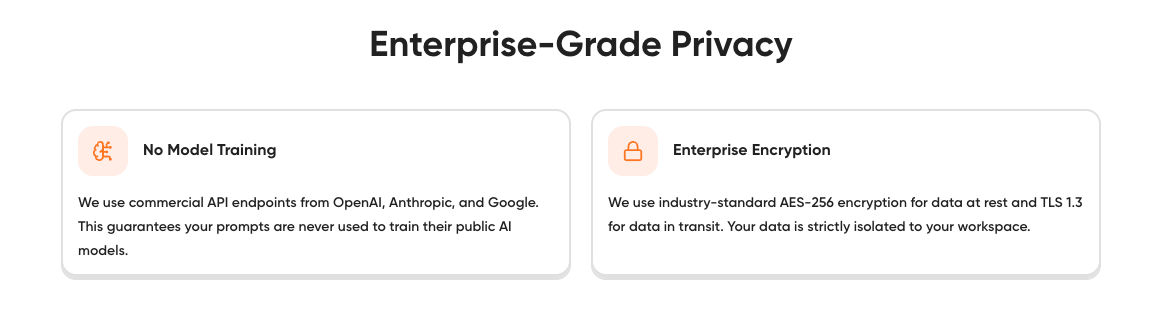
Geekflare Chat uses commercial API endpoints from OpenAI, Anthropic, and Google, which means your prompts are never used to train public AI models.
Data at rest is encrypted with industry-standard encryption and strictly isolated to your workspace.
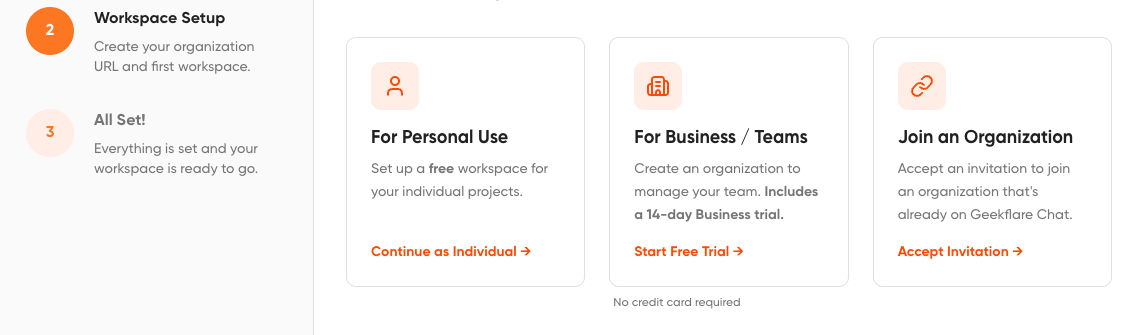
The onboarding is three steps: create an account, set up your workspace, and pick a model from the dropdown & start chatting. No configuration required before you can do real work.
How to consolidate your AI stack today
If you're staring at a browser with four AI tabs open, the fix is less complicated than it sounds.
Start with an honest audit of what your team actually uses. Not what people say they use, but what's actually open. Which models are getting real queries? Which subscriptions haven't been touched in three weeks?
One survey found that 42% of respondents had stopped using at least one subscription but kept paying for it. Most teams have at least one of those.
Then add up the real monthly spend across every team member. This also includes tools where AI is bolted on as an add-on. Most teams are surprised by the total.
After that, the actual work: migrate your prompts, custom instructions, and workflows into one place.
The brand guidelines in a Google Doc, the ChatGPT system prompts, the prompt templates someone built in Notion; move them into a shared prompt library in a unified workspace. This is the part that takes an afternoon, but it pays back within the first week.
Last step: train your team once. One interface, one 30-minute walkthrough, done. Stop managing five parallel onboarding experiences for five parallel tools.
The bottom line
More tools don't make teams faster. They just make the overhead harder to see until someone actually adds it up.
While 88% of companies are using AI in at least one business function, only 39% report any measurable EBIT impact from AI, and among those, most say it accounts for less than 5% of EBIT.
Scattered tool stacks are a big part of why. You can't build consistent workflows across five disconnected interfaces.
The teams getting real value from AI right now aren't the ones with the most subscriptions. They're the ones who picked a workflow and stuck with it.
Shared prompts, a centralized knowledge base, one interface your whole team knows; that's what actually scales.
Geekflare Chat gives you access to GPT-5, Claude, and Gemini in one workspace for $9/month solo or $29/month for a team of five. If you're currently paying $60 per person per month across separate subscriptions, the math isn't close.

Author
Guest Post
Content Writer
Continue reading

General
The Best Reverse Image Search for Photographers. Set Up Copyright Notifications!
If you are a photographer looking for a smart way to find your copyrighted content shared online, this is the place for you! In this article, we will explain how you can search for your photos being reposted, and the best ways you can automate the searching.

General
Face Search API by lenso.ai for businesses: Top 5 Industries and use cases
If you run a business and wonder how to boost your user engagement or add a feature that may become a game changer – we do have a solution! You need to implement the face search API from lenso.ai. Check whether your use case may be a good fit for reverse face search integration.

General
How Teams Can Improve Their Image Search Skills with AI-Powered Tools
AI-powered visual tools are changing how photographers, digital marketers, content creators, and researchers work. In a single day, one person might trace the source of a photo, check a campaign image for duplicates, and look for similar visuals for a new project. The tools evolve quickly, and training often struggles to keep up.

General
Lenso.ai vs. Yandex. Reverse Image Search + Face Search Compared
Yandex and Lenso.ai are both reverse image search websites that are used by people wanting to find objects, places or people online. Is there a clear winner between the two? Who does what best? In this article, we will compare Lenso.ai and Yandex and we will try to select the website who performs better depending on your personal requirements.