
Preview in:
Types of AI and how to tell them apart
The main difference between generative AI and non-generative AI is their function and output:
1. Generative AI (Creates New Content)
- Purpose: Generates entirely new text, images, video, music, or other content based on patterns learned from data.
- How it works: Uses models such as neural networks to create new data that resembles existing data.
- Example: ChatGPT can write an original story, DALL-E can create an entirely new image from a prompt, and a text to video AI generator can produce unique video content from textual descriptions.
- Use cases: Content creation, design, coding assistance. LLM gateways can be utilized for this purpose, enhancing the creation of original content.
2. Non-generative AI (data processing & analysis)
- Purpose: Identifies patterns, makes decisions, classifies, predicts, or recommends, but does not generate original content.
- How it works: Uses AI models such as decision trees, support vector machines (SVMs), and deep learning classifiers to analyze and process existing data.
- Example: Netflix recommends movies based on your viewing history, but doesn't generate new movies. Lenso.ai’s facial recognition system can identify a person, but it doesn't create new faces.
- Use cases: Fraud detection, search ranking, spam filtering, reverse image search.
The threat of AI
AI-generated content is starting to flood the Internet. With the growing popularity of ChatGPT, it is easy to set up a bot to generate essays, articles, or even comments on social media. In addition, AI music, images, and Image to video AI creations have begun to gain popularity in online ads, banners, and more.
Should you be concerned?
Right now, we can usually tell the difference between AI-generated content and the real thing, but that's not always the case. Often, AI images, videos, or text look so real that they can be mistaken for the real thing. In such cases, using an AI checker can help verify whether the content was machine-generated or not. Anchor:AI checker
However, all AI is trained on human-generated content. While it may seem like these systems create something new, they are built on patterns and information already available. With the growing use of tools like free ChatGPT, it’s easy to access AI-generated content—but that doesn't mean it can fully replace human creativity. AI still lacks the ability to add real emotion, depth, or original thought, which is why human-made art and writing continue to hold more value.
AI in lenso.ai - is it a threat to anyone’s creativity?
Lenso.ai is not a generative AI, so it does not compromise creative art and human-created content. It does not create new content, but operates on the images that have already been created.
Can lenso.ai detect AI content?
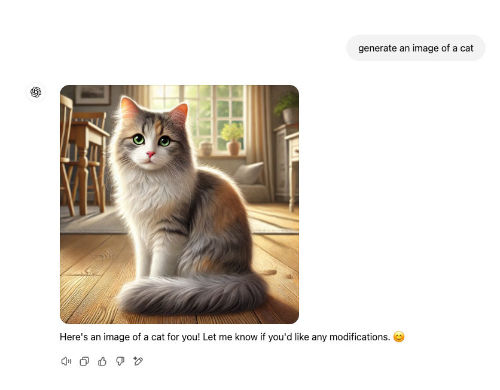
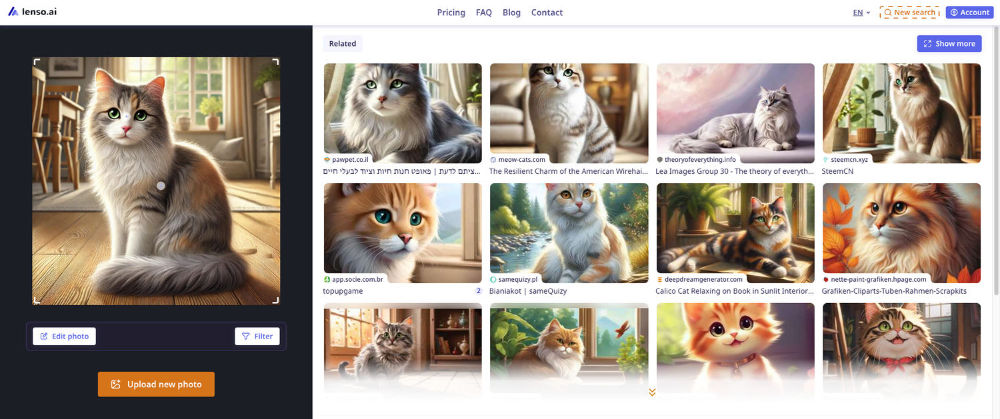
Uploading AI-generated images to lenso.ai usually returns more AI content - be it places, faces, similar images or other photos. This can be helpful when trying to check if an image we have is AI-generated, but it can't be used as the only proof.
Learn more about AI image search here:
If you would like to try AI image search for yourself, check out lenso.ai!

Author
Kinga Jasinska
Marketing Specialist
Continue reading

General
7 Steps to Build a More Efficient Digital Workflow for Your Team
Every team has its own workflow. This process is usually not well thought out. It’s not created as a finished, ready-to-use item, but develops through the process of formation through spreadsheets, everyday messaging applications, informal agreements, and accumulated experience.

General
Visual Product Education: 6 Ways Ecommerce Brands Can Use Images to Build Customer Confidence
High product understanding is a direct prerequisite for high purchase intent. That’s why ensuring your target audience understands your solutions and their value is essential for guiding them toward conversion. However, communicating product benefits can be slightly more challenging online than in-store.

General
The Best Reverse Image Search for Photographers. Set Up Copyright Notifications!
If you are a photographer looking for a smart way to find your copyrighted content shared online, this is the place for you! In this article, we will explain how you can search for your photos being reposted, and the best ways you can automate the searching.

General
Face Search API by lenso.ai for businesses: Top 5 Industries and use cases
If you run a business and wonder how to boost your user engagement or add a feature that may become a game changer – we do have a solution! You need to implement the face search API from lenso.ai. Check whether your use case may be a good fit for reverse face search integration.

General
How Teams Can Improve Their Image Search Skills with AI-Powered Tools
AI-powered visual tools are changing how photographers, digital marketers, content creators, and researchers work. In a single day, one person might trace the source of a photo, check a campaign image for duplicates, and look for similar visuals for a new project. The tools evolve quickly, and training often struggles to keep up.