Preview in:
1. Lenso.ai — Best Overall for AI-Powered Image and Face Search
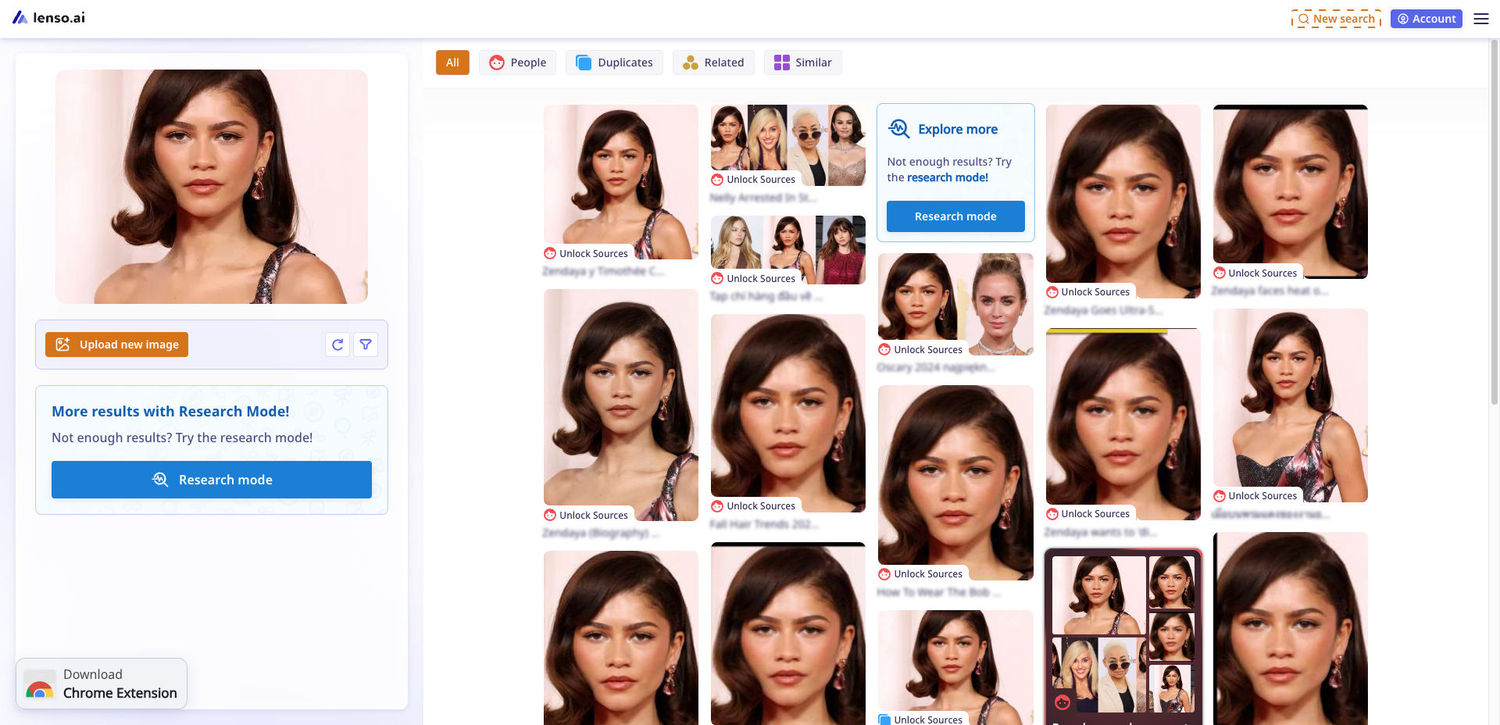
Lenso.ai tops this list because it does something most reverse image search engines don't: it sorts results into distinct categories — People, Places, Duplicates, Similar, and Related — instead of dumping everything into one undifferentiated feed. Upload a photo and the platform routes it through AI models trained for each category, so a portrait search surfaces facial matches while a product shot surfaces near-identical listings elsewhere on the web.
That structure matters in practice. A photographer checking for stolen work doesn't want to sift through loosely "similar" images to find an actual reposted copy — Lenso.ai's Duplicates category isolates exact and edited re-uploads on its own. Its Research Mode extends that further, unlocking up to 10,000 results for People and Duplicate searches instead of the smaller default set, and its advanced filters let you narrow by domain, language, date range, and image size when you're trying to pin down where and when a photo first appeared.
Lenso.ai also ships a developer-facing side: a Reverse Image Search and Face Search API with up to 5,000 calls a month on the Developer plan, which is worth a look if you're building verification or moderation features into your own product. Between the category-based results, the filtering depth, and the clean upload flow, it's the tool that feels purpose-built for 2026's version of this problem rather than bolted onto a general search engine.
2. Google Lens — Best for Everyday, General-Purpose Searches
Google Lens is still the default reflex for most people, and it's a fair one. Built into Chrome, Android, and the Google app, it draws on an index that dwarfs the competition — well over 100 billion images, by most current estimates — which makes it the strongest option for identifying products, landmarks, plants, and text embedded in a photo.
Where Lens tends to lag is precision. It ranks by visual similarity rather than exact matching, so a cropped, recolored, or forum-reposted image can slip past it entirely. For quick, everyday lookups it's hard to beat; for tracking down a specific stolen photo or a hidden repost, it's usually just the first stop.
Is Google Lens Good for Finding Stolen Photos?
Not especially. Lens is optimized for object and landmark recognition, not exhaustive duplicate tracking. If your goal is copyright enforcement, pair it with a provenance-focused tool like TinEye or a category-based engine like Lenso.ai rather than relying on Lens alone.
3. TinEye — Best for Exact Matches and Image Provenance
TinEye has one job and does it with more precision than almost anyone else: finding the exact same image, even after it's been resized, cropped, or recompressed. Its index has grown past 77 billion images, and its standout feature is a "first seen" timestamp that shows when and where an image first appeared online — genuinely useful for proving a photo predates a claim or catching a stolen product listing.
The trade-off is scope. TinEye doesn't do facial similarity and it won't surface loosely "related" images the way Lens or Lenso.ai will. Treat it as a forensic tool for provenance, not a general discovery engine.
4. Yandex Images — Best for Facial Similarity
Yandex has an odd reputation outside Russia, but among OSINT researchers and journalists it's consistently rated the strongest general-purpose engine for facial similarity — often surfacing look-alike matches that Google and TinEye miss entirely, particularly for faces and content tied to European and Cyrillic-language websites. That's exactly why it shows up in most investigator toolkits alongside face-specific tools.
5. Bing Visual Search — A Solid Second Opinion
Bing runs on its own index, separate from Google's, which means it periodically turns up source pages or similar images the others miss entirely. It's built into Microsoft Edge with a simple right-click, which makes it a frictionless option if that's already your browser. It rarely wins outright against the specialists on this list, but as a quick, free second pass, it earns its spot.
6. PimEyes — Best for Dedicated Face Search
PimEyes is built exclusively around facial recognition and is trained specifically to find where a person's face appears elsewhere online, rather than general objects or landmarks — it returns zero results for a landscape photo, for instance, because that's simply outside its scope. It also deletes uploaded photos after 48 hours, a privacy detail worth knowing before you upload anything sensitive.
Why Does PimEyes Return No Results Sometimes?
A "no matches" result from PimEyes doesn't mean a photo is fake or original — it usually means the face hasn't been indexed yet, comes from a private account, or appears on a site the crawler doesn't reach. Absence of results is not proof of absence online.
7. SauceNAO — Best for Art and Illustration Sources
SauceNAO is a narrower tool, but it fills a gap the general engines consistently miss: tracking down the original artist behind anime art, manga panels, and illustrations. When Google or TinEye come up empty on a piece of fan art, SauceNAO frequently succeeds, because it's indexed against art-specific databases like Danbooru and pixiv rather than the general web.
8. HIX AI — Best for Turning Your Search Results Into a Report
HIX AI isn't a reverse image search engine, so it won't find where a photo came from. What it's genuinely good for is the step that comes after: once you've pulled matches from Lenso.ai or TinEye, you still have to write up what you found, and that's usually where the real time gets lost. HIX AI, an AI Agent Workspace, keeps that whole follow-up process in one place instead of bouncing between a notes app, a writing tool, and a slide editor. Describe what you need in a single sentence and it coordinates the research, writing, and formatting on its own, rather than making you configure each step by hand.
That matters most if this kind of verification is a recurring part of your work — say, a weekly roundup of flagged images or a standing client report. You can schedule the workspace to pull fresh context on a set day and hand you a finished draft, and if the output needs to go out as slides, HIX AI's AI Slides generates a formatted deck directly from that research rather than leaving you to rebuild it from scratch. It's not a tool for finding the image — it's a tool for not losing an afternoon writing up what you found.
How to Choose the Right Reverse Image Search Tool
No single engine covers every use case well, and the sites above make that clear on their own. A quick way to match tool to task:
- Verifying a dating profile or suspected catfish — start with Lenso.ai's People category or Yandex, then cross-check with a second face-search tool.
- Protecting your own photography or artwork — Lenso.ai's Duplicates category or TinEye for exact-match tracking, SauceNAO if it's illustration work.
- Everyday curiosity about a product or landmark — Google Lens is fast, free, and usually enough.
- Investigative or journalistic verification — run the image through at least two engines; each one indexes a different slice of the web, and a match in one doesn't guarantee a match in another.
- Writing up or presenting your findings afterward — HIX AI isn't a search tool, but it's worth having on hand for turning the results into a report or deck without doing it manually.
Conclusion
Reverse image search stopped being a single-tool decision a while ago. Lenso.ai stands out for organizing results by what you're actually trying to find rather than throwing everything into one list, and its filtering and Research Mode make it a strong first choice for anyone tracking faces, duplicates, or copyright misuse. Google Lens, TinEye, and Yandex still each own a specific job — scale, provenance, and facial matching, respectively — and HIX AI covers the part none of them touch: writing up what you found. The smart move remains running an important search through more than one engine, then using the right tool to turn the results into something you can actually share.

Author
Guest Post
Content Writer
Continue reading

General
Visual Product Education: 6 Ways Ecommerce Brands Can Use Images to Build Customer Confidence
High product understanding is a direct prerequisite for high purchase intent. That’s why ensuring your target audience understands your solutions and their value is essential for guiding them toward conversion. However, communicating product benefits can be slightly more challenging online than in-store.
General
The Best Reverse Image Search for Photographers. Set Up Copyright Notifications!
If you are a photographer looking for a smart way to find your copyrighted content shared online, this is the place for you! In this article, we will explain how you can search for your photos being reposted, and the best ways you can automate the searching.

General
Face Search API by lenso.ai for businesses: Top 5 Industries and use cases
If you run a business and wonder how to boost your user engagement or add a feature that may become a game changer – we do have a solution! You need to implement the face search API from lenso.ai. Check whether your use case may be a good fit for reverse face search integration.

General
How Teams Can Improve Their Image Search Skills with AI-Powered Tools
AI-powered visual tools are changing how photographers, digital marketers, content creators, and researchers work. In a single day, one person might trace the source of a photo, check a campaign image for duplicates, and look for similar visuals for a new project. The tools evolve quickly, and training often struggles to keep up.