
Preview in:
Unfortunately, even though it has become easier to find a potential date online, it has also become much easier to scam people on a massive scale. We need to know how to prevent this. So let’s start with some of the top red flags you should watch out for when chatting with someone on dating apps.
Love or Fraud? How to spot and avoid online Valentine’s Day scams
Online dating: 10 red flags you shouldn’t ignore
- Too good to be true: a perfect profile photo (likely taken from a stock service)
- Little or no information about basic background (job experience, country/city of residence, etc.)
- The story doesn’t match when you ask detailed questions or repeat the same question later (this is often a sign of a fake profile)
- Refuse to meet via video chat or send additional photos.
- Immediate expressions of love: a manipulation tactic that pretends it’s love at first sight online.
- Pressure to leave the app and continue the conversation through direct messaging platforms.
- Unexpected requests for financial help, often following stories about a stolen or blocked card
- Sending suspicious links or making unusual requests that ask for personal details or encourage you to leave the app.
- Poor language or messages that follow a bot-like template.
- Generic message style: pay attention to repeated greetings, goodbyes, and expressions.
How to spot a fake dating profile?
Apart from the red flags mentioned above, you can also check if a profile is fake or suspicious and even just reassure that the person you’re speaking to matches the photo.
Avoiding Online Dating Scams Just Got Easier: Spot Deepfakes
The easiest way is to check that photo via a reverse face search tool. But only check with the one which has a facial recognition engine - as lenso.ai, for example.
Spot fake dating profile with a reverse face search tool
All you need is a photo of the person you’re chatting with. If you have multiple photos, it’s even better to run them all through a face search tool, as different images can sometimes yield different results.
Spot catfish online using facial recognition tools!
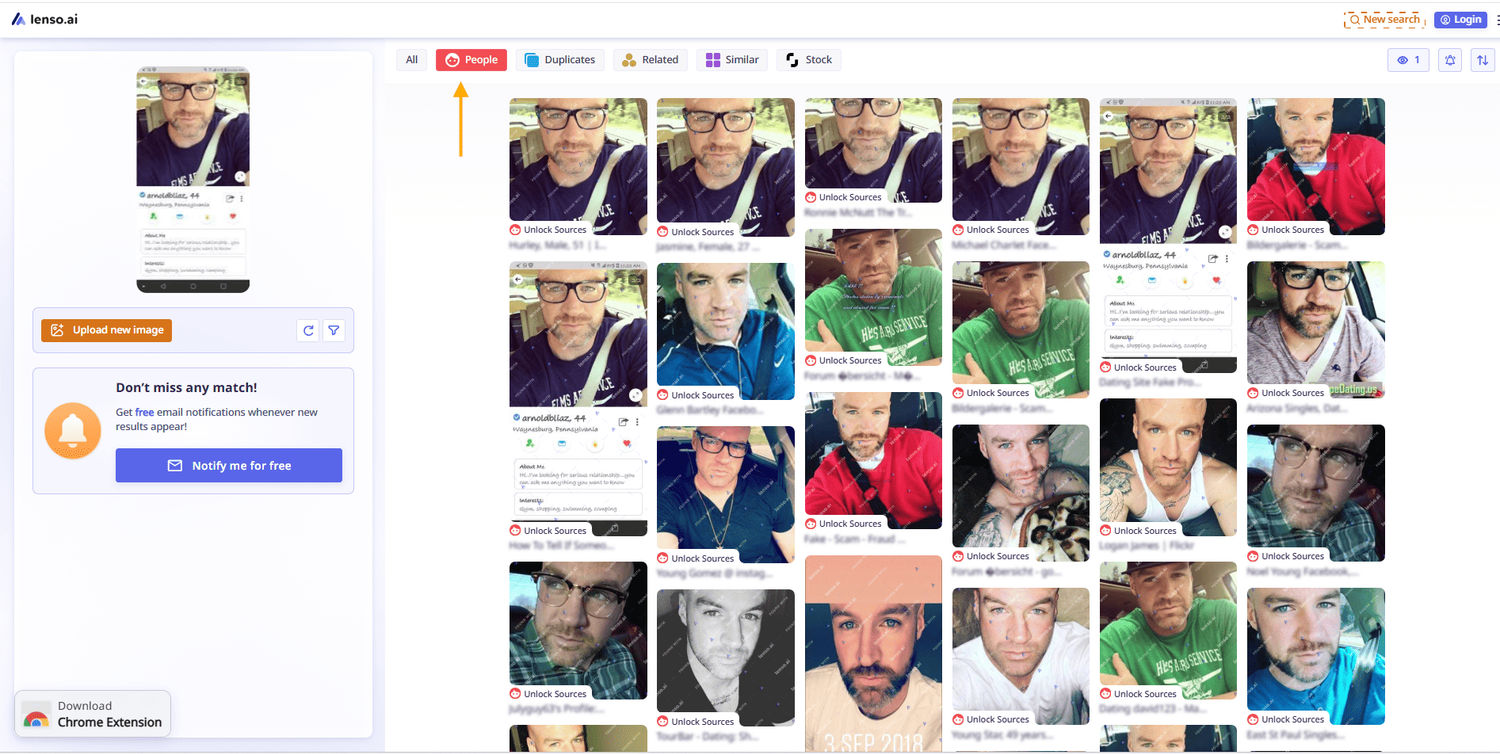
Then go to lenso.ai and upload a photo. If there any face matches, you will find it under “People” category:
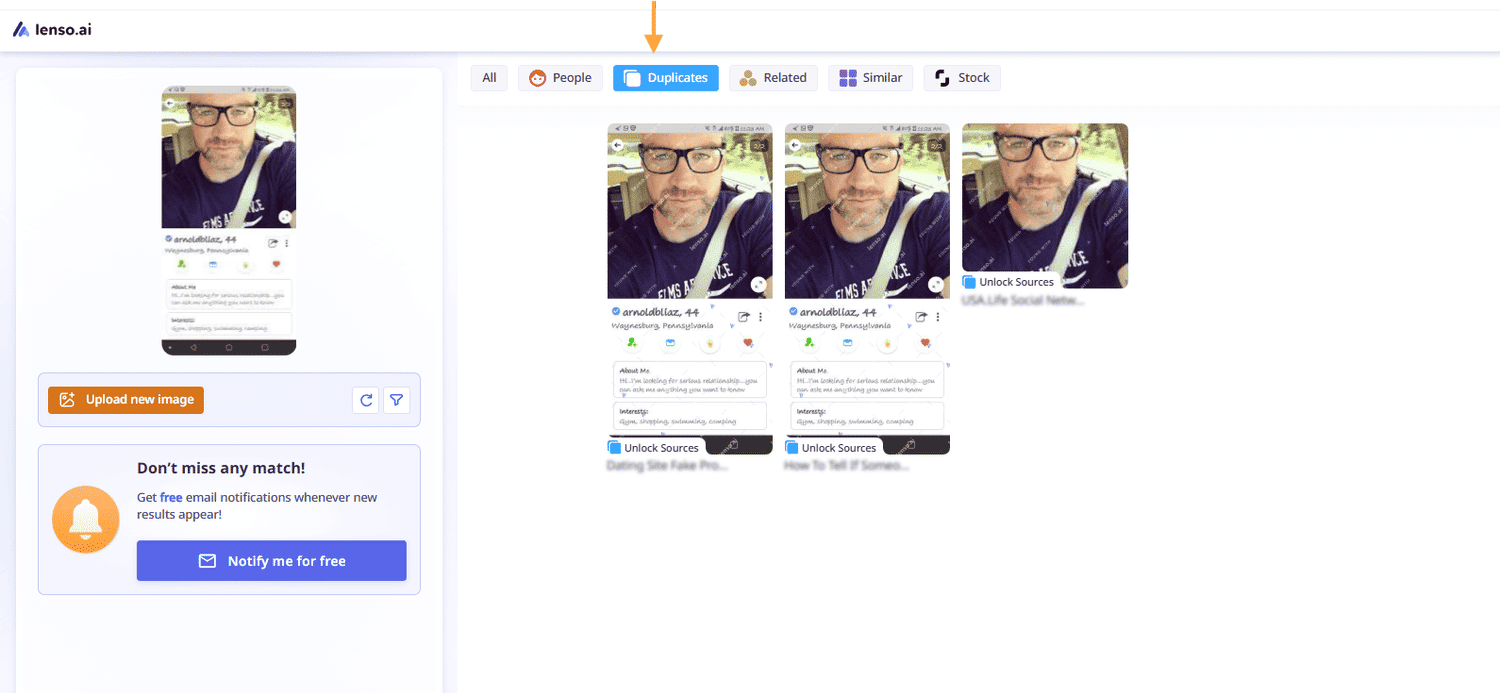
Also, check for ‘Duplicates’ to see if the exact image appears elsewhere online. If it’s a lazy catfisher, they will probably use the same image across different dating platforms - this can be an important clue.
Under each image, you’ll see a URL (or multiple URLs) showing where the image was originally found - this can answer many of your questions.
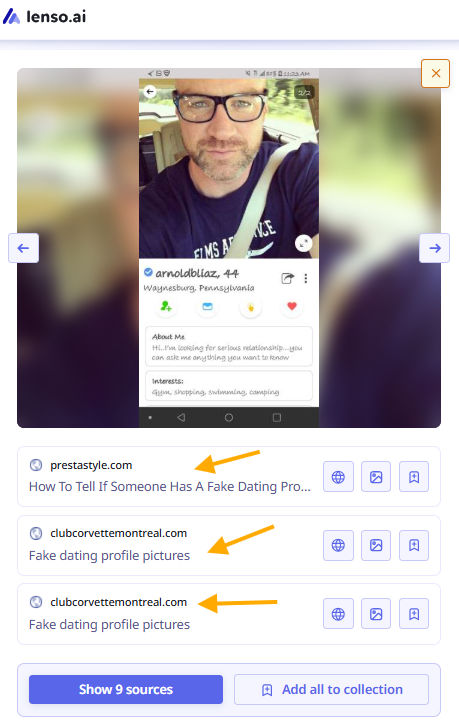
On these pages, you can check:
- Personal information about the person (name, surname)
- Basic background details
- Associations (for example, lenso may find images of this person with someone else, which can provide additional context)
- Whether the image has appeared on catfishing or scam forums
With lenso.ai you can also:
- Create a free alert to be notified of any new image matches as soon as they appear online. This is a perfect solution if you’re continuing to communicate with someone but want to stay sure about their authenticity.
- You can also filter the image search by specific domains, especially if you know sites that often expose dating scams.
Protecting Your Privacy Beyond Dating Apps
While reverse image searches can help you spot fake profiles, it's also important to consider your own digital footprint. Services like Incogni can help you remove your personal information from data brokers, reducing the risk of it being used to create fake profiles or for other malicious purposes. This protects you from potential scammers and safeguards your online privacy.

Author
Julia Mykhailiuk
Marketing Specialist
Continue reading

Guides
How to find the perfect fall photoshoot location from a photo?
Fall is the perfect time for a new photoshoot, whether you want to create fresh content for your personal social media accounts or promote your product or brand with an authentic fall vibe. But first, you need to find the right place. Find out how to discover the perfect fall photoshoot location from a photo.

Guides
What to do in the first ten minutes after you find your own face in a reverse image search?
Finding your own face in a reverse image search is a strange feeling. Not usually because the result is sinister, most of the time it is a conference photo, an old profile picture, a team page from a job you left in 2019, but because you did not put it there and you did not know it was there.

Guides
Is your match real? Reverse image search a dating profile
Dating apps are probably the go-to solution for finding a potential date, but unfortunately, they can also be one of the riskiest options. How can you make sure your match is real? Do a reverse image search and find more information using their dating profile picture.