
Preview in:
How could your photos have been leaked?
Your photos can end up online without your knowledge in several ways, such as:
- Data breaches - when a platform you use gets hacked, and private images are exposed
- Compromised accounts - if someone gains access to your email, cloud storage, or social media, they can download and repost your photos. A dark web monitor alerts you quickly if your login info is ever found on the dark web.
- Photos shared by a partner/friend - photos you send privately can be saved, forwarded, or posted without consent
- Images shared on private forums saved by a stranger - sharing your photos on social media or other forums behind a paywall comes with a risk of photos being stolen and used elsewhere
How to find your leaked photos online? Top 5 methods
1. Use facial search
The easiest and most accessible method is facial search. Face search pages can find your photos online using nothing but a photo of your face!
How to use face search to find your leaked photos?
To find your leaked images online, go to lenso.ai facial search and upload a photo of your face.
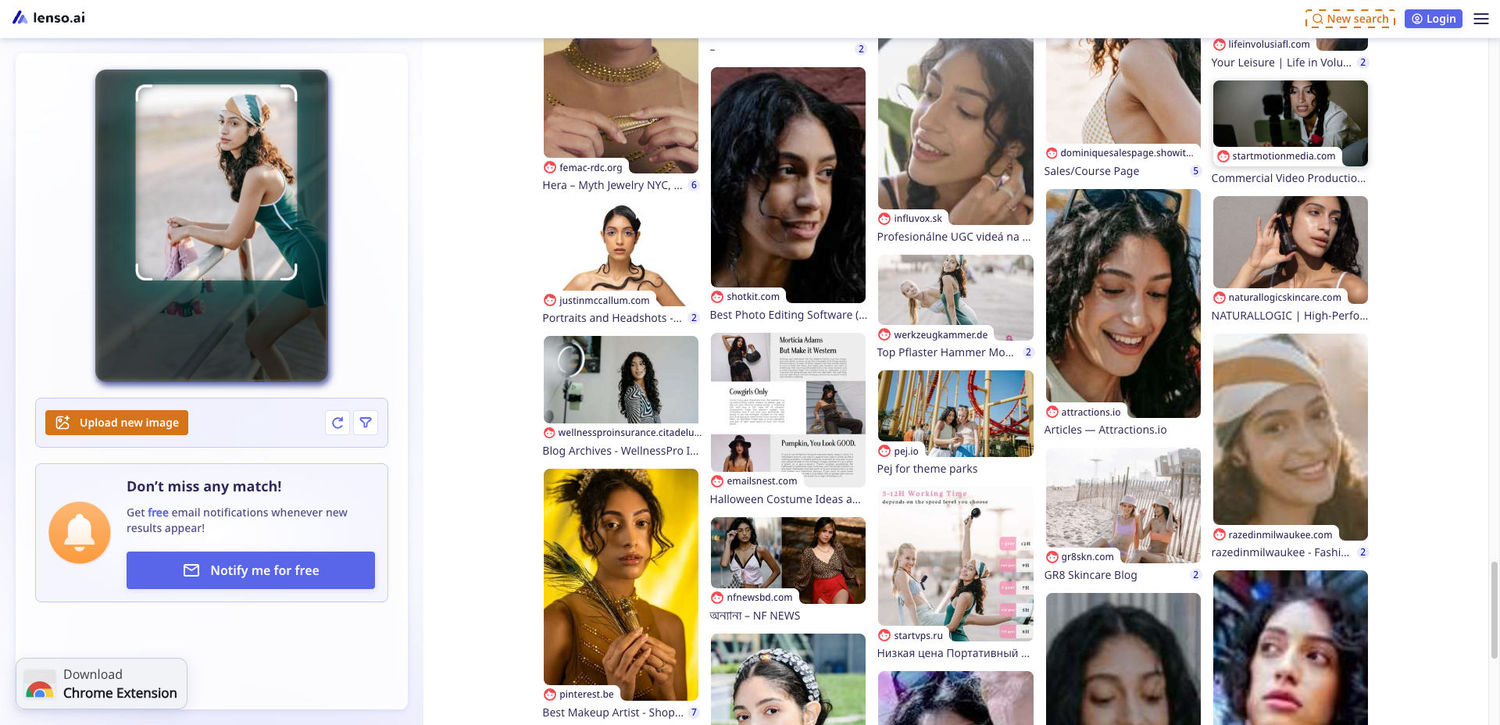
Face search pages detect your facial features to find your images all around the internet. It’s simple, effective, and accessible for most people.
Upload your image here to make a search
Click below and upload your face to find your photos online!
2. Use reverse image search tools
Various image search engines can find your photos online. Outside of using popular engines, like Google Lens, try:
3. Search your name/username online
Use more than just your name. Utilize Google’s search-refining commands or try different search engines:
- Yandex
- DuckDuckGo
- Brave
- Other search engines
4. Check for data breaches for your email address
If your email leaked anywhere, it’s possible someone got access to your private accounts. Check for data leaks regularly with sites like Have I been PWNed.
5. Dark Web Search
Some of your images may have landed outside of the available Internet. You can use browsers like Tor to access these places. Or use a dark web scanner.
Not sure what the Dark Web is? You can read more on the Dark Web’s Wikipedia page.
How to take down leaked photos?
- Request Removal From the Website Directly - Most platforms have a reporting system for privacy violations. Look for options like Report, Infringement, Privacy Concern, or Non‑consensual image.
- Use Google’s Removal Tools - If the images appear in Google Search, you can request removal through Google’s removal tool. This won’t delete the image from the website, but it will stop it from appearing in search results.
- Contact the Hosting Provider - If the site owner doesn’t respond, check the domain’s hosting provider using WHOIS lookup. Hosting companies often take down illegal or non‑consensual content when notified.
- File a DMCA Takedown Notice - If you own the copyright to the image (most personal photos qualify), you can submit a DMCA request to the site or hosting provider. This is one of the fastest ways to force content removal.
- Report Non‑Consensual Images to Law Enforcement - If the leak is intimate, threatening, or malicious, report it to local authorities. Many countries treat non‑consensual intimate image sharing as a criminal offense.
- Use Professional Content Removal Services - If the photos are spreading across multiple platforms or hard‑to‑reach sites, specialized removal agencies can track them down and file takedown requests on your behalf.
- Remove Cached Versions - After removal, request Google, Bing, or other engines to clear cached copies. This prevents old versions of the page from staying visible after the original is gone.
Extra ways to ensure online safety
Keeping your data safe online is crucial. Here are some ways in which you can maximize cybersecurity with low or no costs:
- Use a VPN - A Virtual Private Network encrypts your internet connection and hides your IP address, making it harder for hackers or trackers to see your activity. Choosing one of the best VPN service providers ensures strong encryption, reliable performance, and better overall privacy protection. For users on a budget, cheap proxies can offer a basic level of IP masking, though they typically lack the full encryption and security features that a quality VPN provides.
- Enable Two-Factor Authentication (2FA) - Adds extra security to your accounts beyond just passwords
- Use Secure Wi-Fi - Avoid public Wi-Fi, or use a VPN when connecting to untrusted networks; If you’re a macOS user, choosing the best VPN for Mac can further enhance protection, ensuring secure and private browsing wherever you connect.
- Browse Safely - Stick to HTTPS sites and avoid clicking suspicious links or downloads
- Limit Tracking - Use privacy-focused browsers, ad blockers, or anti-tracking tools to reduce online profiling
How can you protect your photos from getting leaked in the future?
- Use strong passwords
- Avoid storing sensitive photos on cloud platforms
- Review and limit app permissions
- Share private images cautiously
- Back up your photos to trusted, secure locations only
- Immediately log out of accounts on shared or public devices
- Avoid sharing private/intimate photos on forums that strangers have access to
Final thoughts
We hope this tutorial helped you find your leaked content online! If you found it useful, remember to share these tips with your friends.

Author
Kinga Jasinska
Marketing Specialist
Continue reading

News
5 Best reverse image search tools for finding old photos online
You may not even be aware that someone has misused your old photos, or you may have thought your photos were deleted, but they still appear somewhere online. How can you keep track of your online appearance? Use reverse image search! Check which one is the best to use.

News
Lenso.ai One-Time Payment: Reverse Image Search Without a Subscription
If you want to make unlocks on lenso.ai, but you don’t want to be tied to a subscription, here’s a solution you should consider: one-time payment. With one-time payments, you can purchase the product once, make unlocks and decide if you want to switch to a full plan later! This article explains how you can access the one-time payment and all the benefits it offers.

News
Using facial recognition and reverse image search for public security intelligence
Public security intelligence should implement and use only the best and most advanced tools that can help during the investigation process and provide support at different stages. How can facial recognition and reverse image search help?

News
How do Face Search Tools Work? Facial Recognition AI Models Explained.
Have you ever used a facial search tool and wondered how it works? In this article, we will explain the basics of facial recognition and tell you how face search websites build their own AI for face search engines.

News
Top 10 Reasons Why Lenso.ai Is the Best Face Search Tool Online
There are multiple facial search tools available on the internet. Most of them cost a lot, but do very little. Others provide low quality of results, show paywalls before the search even starts, or reel customers in by false advertising. Lenso.ai is the best facial search tool online, and here are some of the top reasons that prove it.