
Preview in:
Why do you need to protect your logo online?
Logo misuse can cause serious damage to you and your business. Here are a few examples of the potential consequences:
- spreading misleading information about your business or products
- using your logo on fake products to make money
- stealing your logo and using it to create fake copies
- using your logo in online scams or phishing websites
- adding your logo to low-quality websites, which can damage your brand reputation
- using your logo in ads without your permission
How to protect your logo online?
The best way to protect your logo online is to monitor it using a reverse image search tool.
As an example, you can go to lenso.ai (one of the best and most effective copyright image search tools).
How can reverse image search protect your logo online?
Basically, reverse image search can help you:
- constantly monitor your logo usage
- check for any potential misuse, which can simplify reporting
- verify your logo’s performance
So, when you have an image of your logo, you can simply upload it to lenso.ai. Within seconds, you will find exact matches under the “Duplicate” category.
Before monitoring your brand online, businesses should ensure they have a clear and recognizable visual identity. Using a logo maker can help create a professional logo that's easier to use consistently across websites, marketing materials, and digital platforms.
.png)
Then, choose an image from the search results that you would like to check and go to the original source, basically, where it was first published.
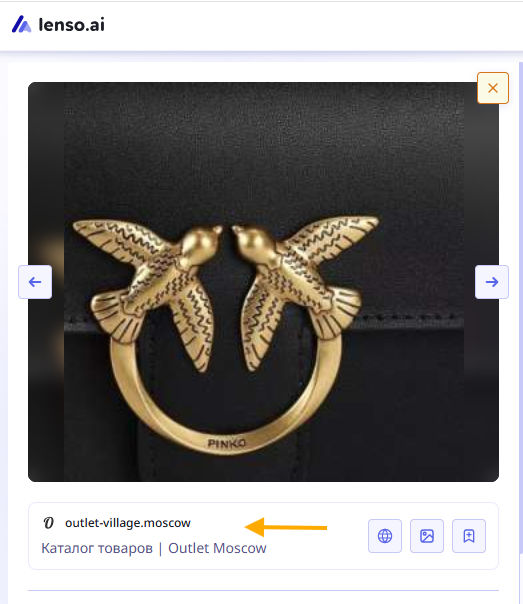
If it is an authorized page, there is nothing to worry about. But if not, you can simply report it.
Lenso.ai offers much more, it can help you refine your search and stay up to date with any new potential copyright misuse.
Research Mode
With research mode, you can perform a deep reverse image search and find up to 10,000 image results. This can help you discover all possible uses of your logo across the Internet.
In addition, Research Mode has advanced filters that help you refine your search:
- Search by specific language
- Search by keywords
- Include/exclude domains
- Date range
- Image quality search
.png)
Research Mode is available in the PRO and Dev plans on lenso.ai.
Alerts about new results
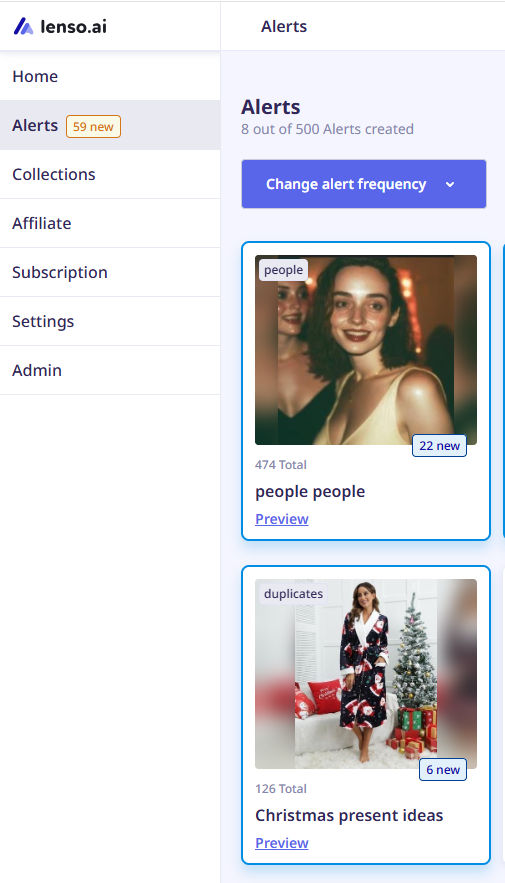
If you want to track any new potential appearances of your logo online, you should create an alert on lenso.ai. Whenever new image results appear, you will receive an email notification.
Protect your logo online - additional services
Besides reverse image search, you can also:
- Proceed with copyright or trademark registration, which can help you with any potential legal processes.
- Use brand monitoring services if you want something more advanced or automated than lenso.ai.
- Apply for DMCA takedown services if there is any copyright misuse.
- Consult with a legal department if you are ready to take legal steps regarding your copyright ownership.

Author
Julia Mykhailiuk
Marketing Specialist
Continue reading

General
The Best Reverse Image Search for Photographers. Set Up Copyright Notifications!
If you are a photographer looking for a smart way to find your copyrighted content shared online, this is the place for you! In this article, we will explain how you can search for your photos being reposted, and the best ways you can automate the searching.

General
Face Search API by lenso.ai for businesses: Top 5 Industries and use cases
If you run a business and wonder how to boost your user engagement or add a feature that may become a game changer – we do have a solution! You need to implement the face search API from lenso.ai. Check whether your use case may be a good fit for reverse face search integration.

General
How Teams Can Improve Their Image Search Skills with AI-Powered Tools
AI-powered visual tools are changing how photographers, digital marketers, content creators, and researchers work. In a single day, one person might trace the source of a photo, check a campaign image for duplicates, and look for similar visuals for a new project. The tools evolve quickly, and training often struggles to keep up.

General
Lenso.ai vs. Yandex. Reverse Image Search + Face Search Compared
Yandex and Lenso.ai are both reverse image search websites that are used by people wanting to find objects, places or people online. Is there a clear winner between the two? Who does what best? In this article, we will compare Lenso.ai and Yandex and we will try to select the website who performs better depending on your personal requirements.