
Preview in:
What is reverse image search for faces?
Reverse image search for faces is a technology that allows you to upload a photo of a person and find other images of that same face across the internet. Instead of searching with keywords, you search using the face itself. Specialized facial recognition algorithms compare the features in your uploaded photo to billions of images online to find matches.
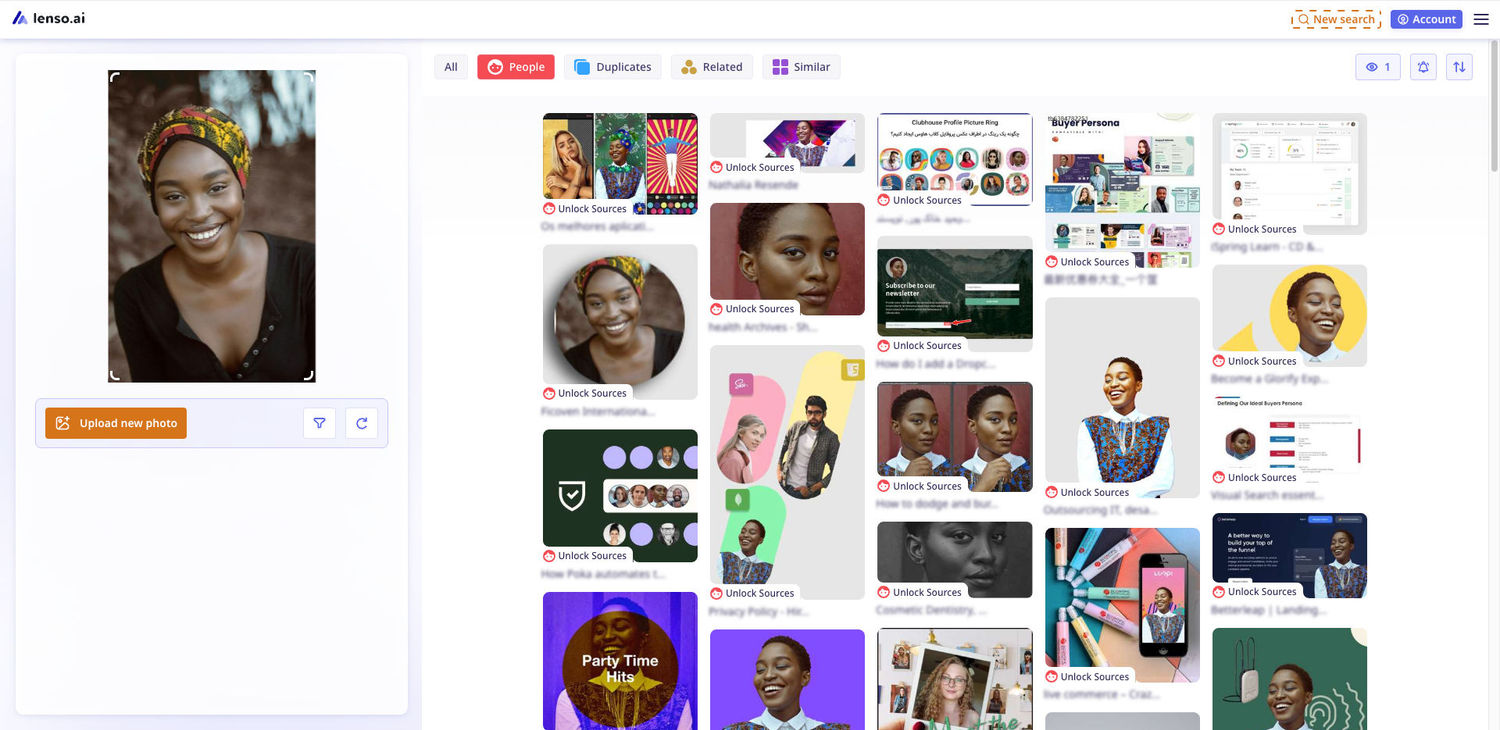
Reverse image search for faces works by analyzing unique facial features in an uploaded photo, such as the shape of the eyes, nose, and mouth, using advanced facial recognition algorithms. The tool scans the internet for images that match these features and displays results with links to where the images appear online. This technology is useful for identifying people, verifying profiles, spotting fake accounts, and finding instances of image misuse. It's powered by machine learning and AI, continually improving the accuracy of facial recognition.
Use cases for face search
Finding Your Own Photos Online
Wondering where your face appears on the internet? Facial search technology makes it easy to find your own photos across websites, social media, and news articles. Whether you're concerned about unauthorized image use, copyright protection, or simply curious about your online presence, facial recognition tools help you track and manage your digital footprint. Finding your photos online also gives you greater control over your privacy and reputation.
Avoiding Online Scams and Catfishing
Catfishing scams and fake online profiles are on the rise. Using a face search engine lets you verify if someone’s profile picture is authentic or stolen from elsewhere. With a simple reverse face lookup, you can protect yourself from fraudsters on dating apps, social media platforms, and even professional networking sites. Spotting fake accounts early helps you avoid emotional and financial scams before they cause real damage. For added security, consider using an identity theft protection service. These services can alert you to suspicious activity, monitor for misuse of your personal information, and provide tools to help you respond quickly if your identity is compromised. Many of these services also offer credit monitoring, which tracks changes to your credit report and alerts you to new accounts or inquiries that could indicate fraudulent activity.
Reconnecting with Friends Using Face Search
Lost touch with an old friend or classmate? Facial search tools can help you reconnect with friends by matching an old photo to their current online profiles. Even if they’ve changed their name or handle, a face search can lead you to their Facebook, Instagram, or LinkedIn profiles. It's a powerful way to rebuild connections that time and distance might have otherwise made difficult.
Finding Old Pictures of Family Members
Preserving family history just got easier with facial recognition search. By uploading old photographs of parents, grandparents, or other relatives, you might find historic images in public databases, school yearbooks, ancestry archives, or community websites. Whether you're creating a family tree or just seeking lost memories, facial search helps you uncover hidden treasures from the past.

Tracking Your Online Fame or Influence
If you're an influencer, entrepreneur, or content creator, monitoring your online image is essential. Facial search technology helps you track where your face appears online, allowing you to find reposts, features, or unauthorized uses of your image. This is especially important for brand management, protecting your personal image rights, and measuring your social media influence across different platforms. Stay on top of your digital reputation with regular facial search scans.
Find your face online*
Find your face with lenso.ai face search.
Upload an image of a person to lenso.ai and make a search. Then, choose the “People” category from the top bar and find your pictures online.
*Available in selected regions

Author
Kinga Jasinska
Marketing Specialist
Continue reading

General
PimEyes not finding your photos? Here's what to try instead
If you're reading this article, you're probably already familiar with Pimeyes and how to use it. But you may be looking for PimEyes alternatives because you haven't found enough results or simply want to try another face search tool. Check out what you can try instead of Pimeyes.

General
Designing "Find Similar Products" UI Patterns for E-Commerce Websites
Every online store has the same quiet moment of truth. A shopper lands on a product that is almost right. The color is close but not quite, the price is a little high, or the size they need is sold out. What happens next decides whether they keep exploring your catalog or close the tab.
General
Best AI photo protection tools in 2026
Information, and especially photos, spreads online very quickly. And basically, you cannot control it – at least not by checking manually. The best way is to use an AI photo protection tool to prevent any potential misuse or keep an eye on where your photos appear online and in what context. Let’s check out the best AI photo protection tools.

General
7 Steps to Build a More Efficient Digital Workflow for Your Team
Every team has its own workflow. This process is usually not well thought out. It’s not created as a finished, ready-to-use item, but develops through the process of formation through spreadsheets, everyday messaging applications, informal agreements, and accumulated experience.

General
Visual Product Education: 6 Ways Ecommerce Brands Can Use Images to Build Customer Confidence
High product understanding is a direct prerequisite for high purchase intent. That’s why ensuring your target audience understands your solutions and their value is essential for guiding them toward conversion. However, communicating product benefits can be slightly more challenging online than in-store.