
Preview in:
Catfish reverse image serch
How to tell you’re being catfished? Most effective tips
Catfish reverse image search tools help you check if someone’s photos:
- are real
- have been used elsewhere online
- show hidden details
- match the story they told you
All you need is their photo.
Best catfish reverse image search tools in 2026
1. Lenso.ai - the best catfish reverse image search
With lenso.ai as reverse image search tool, you can easily check:
- what other photos of the person appear online – including older, changed, or group photos.
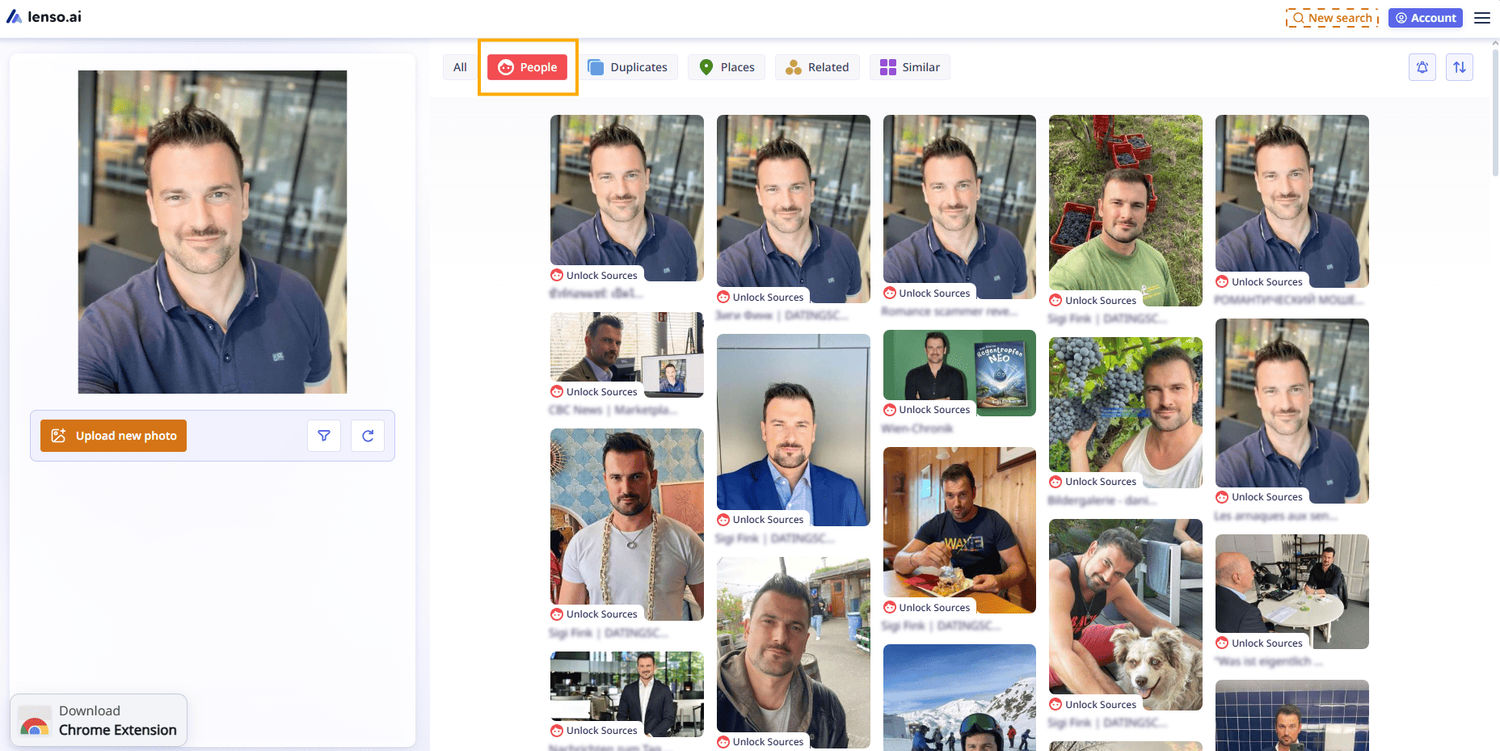
- where the images appear online (for example, on websites related to scam or catfish reports).
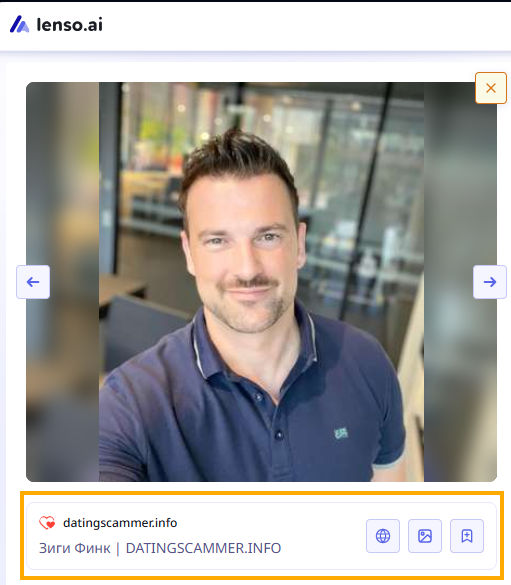
- what information is included on those websites – often there’s a full catfish story or warning.

- basic background check about the person.
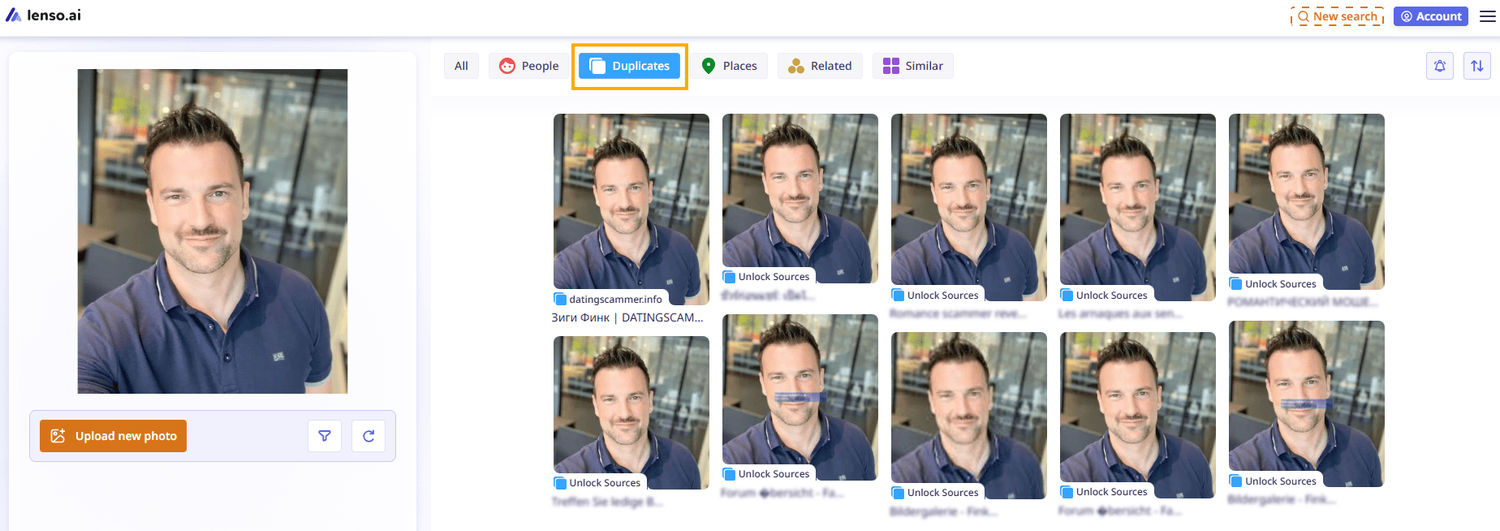
- exact duplicates of the image and where they were published. This can help you see where the photo appeared first and if the story matches what the person told you.
There are also free features that make your catfish image search even more precise:
- Alerts for new image results – even if nothing shows up now, you’ll be the first to know if new results appear later.
- Filters by specific domain or keyword.
- Sorting options: newest/oldest or best/worst match.
2. PimEyes
With PimEyes, you can focus only on face search – you can even use it alongside lenso and compare the results. You might discover even more information about a specific person. You can also group image results or sort them by newest.
It doesn’t offer as many features as lenso.ai, but it’s still one of the best image search tools.
3. Copyseeker
Copyseeker can be especially useful for duplicate image searches. It shows where exact duplicates appear and the title of the webpage. Another advantage is that it’s free to use. However, its image index is much smaller compared to lenso.ai and pimeyes, and it doesn’t offer facial recognition.
Still, it can be a good extra source of information.
4. Facecheck.id
Facecheck.id can also help reveal a potential catfisher, as it has its own face search feature. However, its image index is much smaller compared to other tools, and it only accepts payments in cryptocurrency.
Still, it’s a good alternative for catfish reverse image searches.
5. Yandex
Yandex is a well-known image search engine that can also help you catch a potential catfisher. Its index is quite large, but it’s not as accurate as lenso for exact face matches.
The good news is that it’s completely free to use.
Spot catfish online using facial recognition tools!
What else can help you uncover a potential catfish?
Besides catfish reverse image search tools, you can also check:
- Organizations that help expose scams - people actively report scams there, and they also support scam victims. Example of such institution: SCARS | Society of Citizens Against Relationship Scams Inc.
- Reddit forums – communities like r/catfish are among the biggest, where users post information about potential scammers.
- YouTube channels – some creators (like this one: https://www.youtube.com/@ScammerPayback) regularly investigate and share information about catfishers and scammers.
- Websites for reporting scammers – there are dedicated platforms where you can report potential scammers, fraudsters, or catfishers (like here: https://www.thecyberhelpline.com/ ).
- People finder tools can help you discover a person’s name, surname, phone number, or email address (like a personal email finder).

Author
Julia Mykhailiuk
Marketing Specialist
Continue reading

News
Lenso.ai One-Time Payment: Reverse Image Search Without a Subscription
If you want to make unlocks on lenso.ai, but you don’t want to be tied to a subscription, here’s a solution you should consider: one-time payment. With one-time payments, you can purchase the product once, make unlocks and decide if you want to switch to a full plan later! This article explains how you can access the one-time payment and all the benefits it offers.

News
Using facial recognition and reverse image search for public security intelligence
Public security intelligence should implement and use only the best and most advanced tools that can help during the investigation process and provide support at different stages. How can facial recognition and reverse image search help?

News
How do Face Search Tools Work? Facial Recognition AI Models Explained.
Have you ever used a facial search tool and wondered how it works? In this article, we will explain the basics of facial recognition and tell you how face search websites build their own AI for face search engines.

News
Top 10 Reasons Why Lenso.ai Is the Best Face Search Tool Online
There are multiple facial search tools available on the internet. Most of them cost a lot, but do very little. Others provide low quality of results, show paywalls before the search even starts, or reel customers in by false advertising. Lenso.ai is the best facial search tool online, and here are some of the top reasons that prove it.

News
How Reverse Image Search Catches Stolen Before-and-After Photos in Home Service Marketing
A tree service in one state removes a storm-damaged oak, photographs the cleanup, and posts the before-and-after shots on Instagram. Eighteen months later, a company three states away is running the exact same photos as their own work on a Google Business Profile, cropped slightly and stamped with a different logo. Nobody at the original company notices, because nobody's looking. Nobody at the second company worries about it, because nobody's ever gotten caught.