man

old

couple

skates

couple

winter

AI Face Search Online

Try the best face recognition search engine

Search for people, faces, celebrities and more.

skates

woman

man

women

couple3

a-couple-exploring-the-web-on-laptop

skates

couple

man

couple

women

a-couple-exploring-the-web-on-laptop

The Best Face Search

How to find your photos online?

Facial Recognition in Image Search

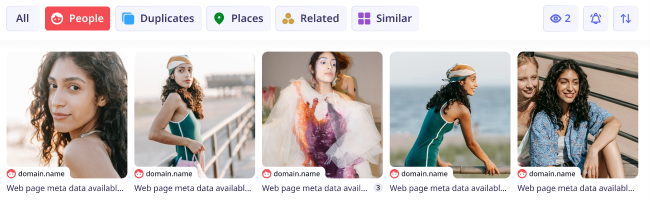
Thanks to lesno.ai’s AI-powered facial recognition, it’s possible to find pictures of any face and person online by uploading their photo. Select the “People*” category to explore many photos of the same person.

categories

Find People Across Categories

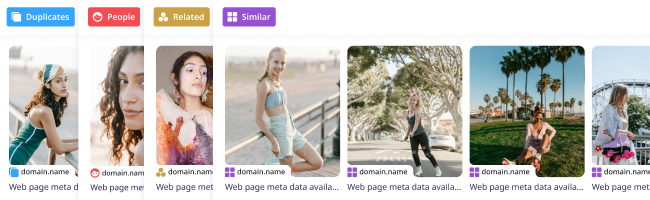
Find pictures of people in the “People” category*, or explore other categories to find duplicates of their images, places where their photo was taken, similar-looking people, or photos related to the search.

face recognition

Track Your Digital Footprint

Use lenso.ai to find where your photos appeared online. Set up alerts for the people category to never miss any picture of you that was used without your consent. Find out where your images appear online and protect your privacy.

duplicates

Face Search API

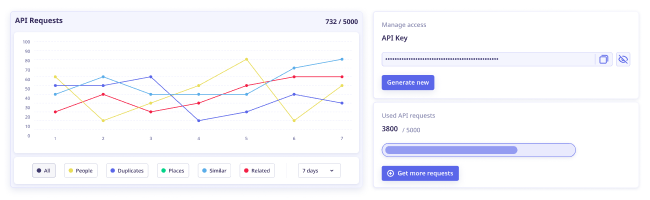
Use lenso.ai’s facial search in your applications! Purchase the Developer subscription and enjoy up to 5000 API calls/month with lenso.ai’s Face Search API. The integration is simple and intuitive. You can track the usage in your user panel.*

easy intuitive

Only in Professional

Face Search with Research Mode & Advanced Filters

People
Duplicates
Advanced Filters
Research mode result
domain.name

Web page meta data...

Research mode result
domain.name

Web page meta data...

Research mode result
domain.name

Web page meta data...

Research mode result
domain.name

Web page meta data...

Research mode result
domain.name

Web page meta data...

More filters!

10x more results!

Deeper search

Find More Face Matches

Research Mode expands People search results to up to 10,000, helping you find more public pages where the same or similar face appears online.

Beyond Standard Face Search

Go past the basic results and discover face matches that may be hidden deeper across indexed pages. It only takes a few extra seconds to search much wider.

People
Duplicates
Advanced Filters
Research mode result
domain.name

Web page meta data...

Research mode result
domain.name

Web page meta data...

Research mode result
domain.name

Web page meta data...

Research mode result
domain.name

Web page meta data...

Research mode result
domain.name

Web page meta data...

More filters!

10x more results!

Deeper search

Filter Face Results Precisely

Narrow your face search by language, website domain, date range, image size, or title keyword to focus only on the most relevant appearances.

  • Language
  • Date range
  • Domain
  • Size
  • Keyword in the title
All about Advanced Filters

Learn more about facial recognition

What is Face Search?

How does Face Search work?

Face Search is a technology based on Facial Recognition. Face Search allows to find celebrities and everyday people online. Proper face search tools can find any person from photo with great accuracy, helping with privacy protection and saving users from scammers and catfishing.

Facial Recognition is a technology that works by extracting features from an image uploaded by the user. Key facial features like eyes, nose, mouth, and the space between them are identified and converted into a mathematical representation. A matching algorithm scores the similarity between the user's facial data and entries in the index. Images with scores exceeding a certain threshold are presented as potential matches.

What can Facial Recognition be used for?

It’s advised to use face search for finding our own photos online and tracking our digital footprint. This way, we can protect our privacy and be aware of where our pictures are saved and shared. Facial recognition can also be used by anyone to protect themselves from scammers and catfishers. By looking up photos they send, users can check if the picture is a real person, an AI-generated image, or someone else, like a model or an actor. Sometimes, facial recognition is used to find actors or musicians from a picture. It’s important to always use face search responsibly and always choose reliable facial search engines like lenso.ai.

How to find people from photo online?

To find a person from a picture, it’s important to use facial search tools. Not all image search engines are able to find people online. For facial search, we recommend using lenso.ai face search.

To reverse image search for faces:

  1. Go to lenso.ai and upload an image of your face, clearly visible
  2. Open the “People” category to make sure only the best matches for the face are found
  3. Browse through the results and click on the photo you’d like to see the source of
  4. Visit the website where the photo was found or open the image in a new tab

Face Search for Mobile and Desktop

Facial search engines like lenso.ai work on Android, iOS, Mac, Windows and Linux. To use facial search, open any browser you usually use and search for a face search engine of your choice.

To search for people from image:
On desktop: Navigate to your browser - Chrome, Safari, Firefox or any other, and visit lenso.ai. Upload your image by pasting, dropping or choosing a photo from your computer. Then, from the top bar, choose the category “People”.
On mobile: Go to your mobile browser and in Google, Yandex, DuckDuckGo or any other search engine, type in “lenso.ai”. Upload your photo by choosing a picture from your gallery or taking a photo with your phone. Choose the “People” category.


Do you have any concerns?

Frequently Asked Questions

Learn more about AI-powered facial recognition, how lenso.ai works and any other related questions.

*Facial search is available only in selected regions

Blog: Exploring facial recognition technology

Find Out More About Facial Recognition and Face Search

Discover all the trends in Face Search Technology and find out more about Facial Recognition Engines.

See More on the Blog
Continue reading
Lenso.ai One-Time Payment: Reverse Image Search Without a Subscription

News

Lenso.ai One-Time Payment: Reverse Image Search Without a Subscription

If you want to make unlocks on lenso.ai, but you don’t want to be tied to a subscription, here’s a solution you should consider: one-time payment. With one-time payments, you can purchase the product once, make unlocks and decide if you want to switch to a full plan later! This article explains how you can access the one-time payment and all the benefits it offers.

Continue reading
6 Useful Tools for Finding Similar Images and Exploring Visual Matches

General

6 Useful Tools for Finding Similar Images and Exploring Visual Matches

An image can communicate an idea in seconds, but sometimes the picture itself raises more questions than it answers.

Continue reading
How to find the perfect fall photoshoot location from a photo?

Guides

How to find the perfect fall photoshoot location from a photo?

Fall is the perfect time for a new photoshoot, whether you want to create fresh content for your personal social media accounts or promote your product or brand with an authentic fall vibe. But first, you need to find the right place. Find out how to discover the perfect fall photoshoot location from a photo.

Lenso.ai vs. Yandex. Reverse Image Search + Face Search Compared

General

Lenso.ai vs. Yandex. Reverse Image Search + Face Search Compared

Yandex and Lenso.ai are both reverse image search websites that are used by people wanting to find objects, places or people online. Is there a clear winner between the two? Who does what best? In this article, we will compare Lenso.ai and Yandex and we will try to select the website who performs better depending on your personal requirements.

30.09.2026

What to do in the first ten minutes after you find your own face in a reverse image search?

Guides

What to do in the first ten minutes after you find your own face in a reverse image search?

Finding your own face in a reverse image search is a strange feeling. Not usually because the result is sinister, most of the time it is a conference photo, an old profile picture, a team page from a job you left in 2019, but because you did not put it there and you did not know it was there.

30.09.2026