News
Best Free OSINT tools for people and face search in 2026
If you are about to start your first OSINT investigation, it's best to begin with the top free tools for people and face search. Don’t waste time - solve the case right away!
The Best Face Search
Facial Recognition in Image Search
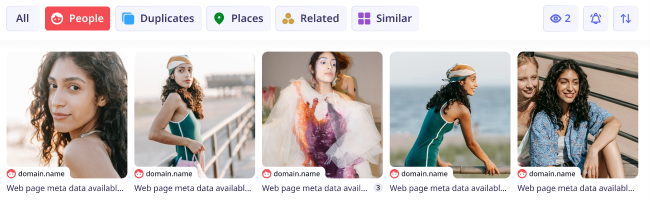
Thanks to lesno.ai’s AI-powered facial recognition, it’s possible to find pictures of any face and person online by uploading their photo. Select the “People*” category to explore many photos of the same person.
Find People Across Categories
Find pictures of people in the “People” category*, or explore other categories to find duplicates of their images, places where their photo was taken, similar-looking people, or photos related to the search.
Track Your Digital Footprint
Use lenso.ai to find where your photos appeared online. Set up alerts for the people category to never miss any picture of you that was used without your consent. Find out where your images appear online and protect your privacy.
Face Search API
Use lenso.ai’s facial search in your applications! Purchase the Developer subscription and enjoy up to 5000 API calls/month with lenso.ai’s Face Search API. The integration is simple and intuitive. You can track the usage in your user panel.*
Available in Professional
More filters!
10x more results!
Deeper search
With Research Mode, you can get access to 10,000 results for People and Duplicates. That’s 10 times more pages to explore for every search you make!
Explore all the results that aren’t displayed in lenso.ai’s normal search. Research mode takes just a few extra seconds to find thousands of results!
More filters!
10x more results!
Deeper search
More filtering options with Advanced Filters! Filter by page language, domain, date range, size of the image and keyword in the title of the page. Find photos faster and easier!
Advanced Facial Recognition
Find your photos anywhere
Find photos of yourself on specific websites or make precise searches with keywords.
Sort Images
Find only the newest or oldest images of yourself, or sort by the best and worst match.
Share Results
Send the results of search to your friends and help them find their photos online.
Explore the People Category
Click on the “People” category to find only the exact matches for any person or face.
Set Up Alerts
Set up alerts for the “People” category and receive emails when lenso finds your face.
Create Collections
Save your photos to collections and sort them by place, occasion, website and more.
Learn more about facial recognition
Face Search is a technology based on Facial Recognition. Face Search allows to find celebrities and everyday people online. Proper face search tools can find any person from photo with great accuracy, helping with privacy protection and saving users from scammers and catfishing.
Facial Recognition is a technology that works by extracting features from an image uploaded by the user. Key facial features like eyes, nose, mouth, and the space between them are identified and converted into a mathematical representation. A matching algorithm scores the similarity between the user's facial data and entries in the index. Images with scores exceeding a certain threshold are presented as potential matches.
It’s advised to use face search for finding our own photos online and tracking our digital footprint. This way, we can protect our privacy and be aware of where our pictures are saved and shared. Facial recognition can also be used by anyone to protect themselves from scammers and catfishers. By looking up photos they send, users can check if the picture is a real person, an AI-generated image, or someone else, like a model or an actor. Sometimes, facial recognition is used to find actors or musicians from a picture. It’s important to always use face search responsibly and always choose reliable facial search engines like lenso.ai.
To find a person from a picture, it’s important to use facial search tools. Not all image search engines are able to find people online. For facial search, we recommend using lenso.ai face search.
To reverse image search for faces:
Facial search engines like lenso.ai work on Android, iOS, Mac, Windows and Linux. To use facial search, open any browser you usually use and search for a face search engine of your choice.
To search for people from image:
On desktop: Navigate to your browser - Chrome, Safari, Firefox or any other, and visit lenso.ai. Upload your image by pasting, dropping or choosing a photo from your computer. Then, from the top bar, choose the category “People”.
On mobile: Go to your mobile browser and in Google, Yandex, DuckDuckGo or any other search engine, type in “lenso.ai”. Upload your photo by choosing a picture from your gallery or taking a photo with your phone. Choose the “People” category.

Reverse image search can help you find anything using only a picture. However, these tools are especially useful for face search. How can AI find a person from a photo?
Looking for a face search API that works with finding people, celebrities, faces and more? Here’s lenso.ai - website with its own API that works as an online person finder.
Most people encounter hundreds of strangers online daily, whether through public forums or direct messages on Instagram, Twitter, or Facebook. While it's incredible that distance is no longer a barrier and we can connect with people who share our hobbies easily, we have to be aware of the privacy and security risks involved. Find out how to identify scammers and spot catfishing online by reading this article. The last paragraph contains instructions with pictures!
Do you have any concerns?
Learn more about AI-powered facial recognition, how lenso.ai works and any other related questions.
1. How to use face search tools?
Face search tools are intuitive and easy to use. All you need is an image that clearly shows a face. You can try face recognition on lenso.ai by simply uploading a photo and starting your face search. If any matches are found, you can check them in the "People" category.

For even better results, consider uploading multiple photos of the same person from different angles.
2. How can AI find a person from a photo?
3. How to find someone using face recognition?
4. Is face recognition safe?
5. What are the best face recognition tools?
*Facial search is available only in selected regions
Blog: Exploring facial recognition technology
Discover all the trends in Face Search Technology and find out more about Facial Recognition Engines.
See More on the Blog
News
Best Free OSINT tools for people and face search in 2026
If you are about to start your first OSINT investigation, it's best to begin with the top free tools for people and face search. Don’t waste time - solve the case right away!
General
Top 5 Mobile-Friendly Reverse Image Search Websites
Looking for a reverse image search site that works on your phone? No need to download applications - here’s a list of 5 great reverse image search websites that work on mobile without downloading.
Guides
Integrating lenso.ai API into Custom Software Solutions for Image Processing
I see a lot of teams chasing image AI without a realistic implementation plan. My view is simple: if I want to add reverse image search, visual matching, duplicate detection, or face-based lookup into a product without building a full computer vision stack from scratch, integrating lenso.ai API into custom software can be a practical shortcut. It gives developers a way to embed image search capabilities into real products while keeping the focus on business logic, workflow design, and user experience.
General
Understanding AI Reverse Image Search and the Privacy Questions It Raises
The way people search for information online is changing. Instead of relying only on text-based queries, users can now upload an image and let artificial intelligence do the work. AI-powered reverse image search tools can identify objects, locate the original source of an image and even recognize faces with increasing accuracy. This shift offers speed and convenience that traditional search methods can't match.