antique

tower

place

car

woman

people

dog

similar

bag

Find Similar Images Online

Find duplicates and copies of images with AI image search

Search for copies, copyright and similar photos online.

couple

desert

related

flower

room

duplicates

man

round cut halo setting diamond ring

by-text
woman

people

desert

duplicates

building

related

place

bag

room

similar

round cut halo setting diamond ring

by-text

Reverse Image Search

Search for Copies of Images

Find Identical and Copied Content

Look for copies of your photos online. Find identical images and duplicates of your photos or search for edited and altered versions of uploaded images. With lenso’s AI-powered search, you can find a copy of any picture.

categories

Protect Your Copyright

Find out where your pictures and trademarked logos are used. Take down your images from any website that infringes your copyright and steals your photos. Lenso.ai is a perfect tool for photographers!

face recognition

Set Alerts for Duplicates of Pictures

Set up alerts to receive notifications anytime lenso.ai finds a copy or duplicate of your photo. It’s the best way to track the usage of your copyrighted content safely and efficiently.

duplicates

API for Copyrighted Images

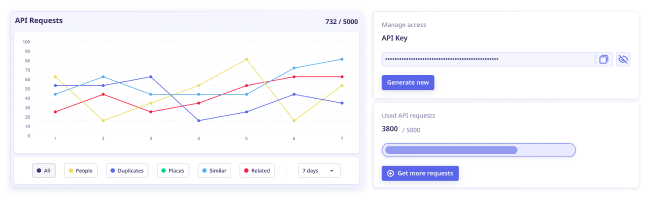
Automate your image search by using lenso.ai’s API. This Reverse Image Search Application Programming Interface works in any application. Get access to 5000 API calls per month with a simple and intuitive API interface.

easy intuitive

Want to get unlimited access to photo sources?

Subscription plans

Discover More Features

Filters, Sorting and Alerts for Reverse Image Search

Smart Filters

Filter photos by keywords and domain to detect any copyright violation and take instant action.

Easy Sorting

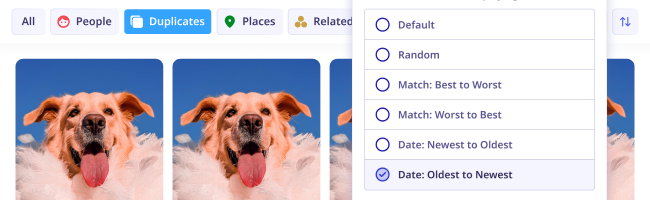
Optimize your search! Sort from best or worst match, newest or oldest pictures or randomize.

Share Search Results

Working with copyright violations? Share the results with customers to simplify your work.

Duplicates Category

Open the “Duplicates” category to find only the identical or edited versions of the uploaded photo.

Get Alerts and Notifications

Receive email notifications whenever lenso finds a match for your photo in the “Duplicates” category.

Save Photos to Collections

Working with hundreds of copies just got easier! Save photos to collections to find them easily.

Learn more about finding copies of photos online

How to find similar pictures online?

What is copyright image search?

Copyright image search is a type of image search that’s made specifically to look for copyrighted images. To put it simply, this reverse image search finds exact copies of photos uploaded by user and images that are very similar - either the same images that have been edited, or images that include the photo uploaded by user as a part of a bigger picture. This type of search is used by anyone who wants to find where photos they took are used online.

How does similar image search work?

Why you should search for copies of images?

Searching for copies of photos is useful in a variety of fields. Duplicate image search should be used by artists and photographers who want to check if their work is not used without consent on other websites. Copyright image search engines like lenso.ai are used by photographers due to their accuracy and the option to set up alerts for their photos.

Searching for copies of photos can also be useful for businesses and entrepreneurs. Finding out where trademarks are used is a good way to track where the company has been mentioned. Moreover, protecting trademarks and company resources is the best way to protect them from being stolen and misused.

How to protect copyright of your photos?

How to find copies of photos online?

Copies of our pictures online can be posted on different websites without our knowledge. To avoid getting our pictures stolen and edited, it’s best to utilise image search. Here’s a short tutorial on how to seek for copies of our photos:

  1. Visit a reverse image search website dedicated to finding copied pictures, such as lenso.ai
  2. Upload your image by dragging, pasting or uploading from your drive
  3. Change the category to “Duplicates” for the most accurate results
  4. Click on any result you like best and check the URL of the website lenso.ai found

You can also set up alerts in order to get notifications whenever lenso.ai finds a new match for any photo you uploaded.

How to find similar images with reverse image search?

Copyright search for Desktop and Mobile

Duplicate image search is available for Android, iOS, Mac, Windows and Linux. You can use photo finders to find copyright infringements, duplicated and identical pictures online and more.

To search for a copy of any photo:
On desktop: Navigate to your browser - Chrome, Safari, Firefox or any other, and visit lenso.ai. Upload your image by pasting, dropping or choosing a photo from your computer. Then, from the top bar, choose the “Duplicates” category to make sure you look for duplicated and very similar images only.
On mobile: Go to your mobile browser and in Google, Yandex, DuckDuck Go or any other search engine, type in “lenso.ai”. Upload your photo by choosing a picture from your gallery or taking a photo with your phone. Choose the “Duplicates” category to make sure the images you find are exact copies or very similar pictures.


How to use image search on a mobile phone?

All about finding similar pictures

Guides Person in purple AI visualization

Copyright Laws Regarding Images - How to Protect Your Business?

Nowadays, as the internet grows rapidly, keeping your images safe and protecting your copyright is a great challenge. This is why the laws regarding copyright change constantly. In this article, we will explore the copyright laws in the European Union as well as the United States that are relevant in 2024. We also mention copyright in other countries and their own laws. If you want to learn more about copyright and get some tips on protecting your own work, keep reading!

Continue reading
25.09.2024
News Laptop showing search results

Plagiarism image checker - find duplicate images online!

Looking for a tool to find duplicate images of your work or check if your image has been plagiarized? A reverse image search tool is all you need! Discover the best plagiarism image checker – lenso.ai.

Continue reading
25.09.2024
Guides Code snippet for API integration

How to protect your work online with copyright image search tools?

Copyright infringement happens more often than ever before, especially now that everything is available online. How can creators protect their work online? And is there a way to prevent potential copyright misuse?

Continue reading
06.03.2025

Do you have any concerns?

Frequently Asked Questions

Learn more about AI-powered reverse image search, how lenso.ai works and any other related questions.

FAQ page Contact us

*Facial search is available only in selected regions

Blog: Find Out More About Your Copyright

Read About Copyrighted Content and Image Ownership

Everything you need to know to properly protect your copyright and privacy online with similar image search.

Read more on our Blog
Continue reading
Lenso.ai API | Facial Search and Reverse Image Search API

News

Lenso.ai API | Facial Search and Reverse Image Search API

If you are looking for a face search API or a reverse image search API for your page, tool, or software, lenso.ai’s API is a product for you! Read this article to find out what features lenso.ai’s API offers, and how you can use it in your own application. There were also some changes made for current clients - don’t miss them!

Continue reading

12.12.2025

Continue reading
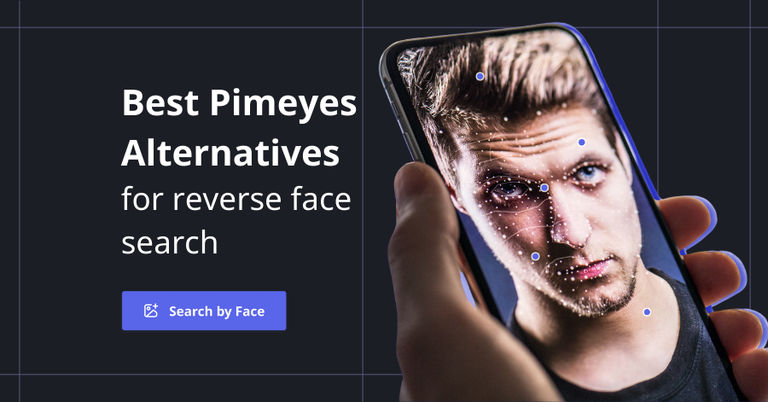
Best PimEyes Alternatives & Competitors for reverse face search in 2025

News

Best PimEyes Alternatives & Competitors for reverse face search in 2025

Looking for an accurate facial recognition tool that's not the popular one? Discover and try best PimEyes alternatives and competitors in 2025.

Continue reading

11.12.2025

Continue reading
 3 Best Google Lens alternatives for reverse image search

Guides

3 Best Google Lens alternatives for reverse image search

Tired of using Google Lens, which brings less and less accurate results in its image search? It’s time to try something new: check out the 3 best Google Lens alternatives for reverse image search.

Continue reading

09.12.2025

Is there a better tool than PimEyes for face search?

News

Is there a better tool than PimEyes for face search?

You’re probably familiar with PimEyes as one of the most well-known face search tools. Maybe you’ve tried it yourself or just read about it. But is there a better tool than PimEyes to help you find your photos online? Let’s find out.

05.12.2025

How Reverse Image Search Can Help Detect Unauthorized Logo Usage

Guides

How Reverse Image Search Can Help Detect Unauthorized Logo Usage

Unauthorized logo usage, such as your logo appearing on counterfeit products or scam sites, can severely damage your brand reputation. Take a look at how reverse image search can help you put a stop to these actions and make your brand identity more secure online.

03.12.2025

About Us

  • Pricing
  • API
  • Privacy Protection
  • Affiliate Program

Resources

  • FAQ
  • Blog
  • Contact

Legal Help

  • Opt-Out
  • DMCA
  • Privacy Policy
  • Terms & Conditions
  • Affiliate Terms

Pages

  • Reverse Image Search
  • Face Search
  • Copyright Search
  • For Shareholders

lenso.ai 2025© v1.0